

Description
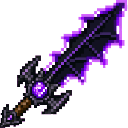
Interact with any vanilla dragon egg to hatch a loyal baby Ender Dragon companion that follows you, is effectively immortal, and defends you by eliminating nearby hostile mobs while teleporting back if it gets too far or changes dimensions. Feed it Ender Pearls or Chorus Fruit to reliably grow it into a rideable adult with a seat and air controls; adult flight now requires equipping a saddle via the new Ender Dragon Inventory UI (open by interacting while holding a saddle, crouch-interacting, or interacting with an unsaddled adult), which shows growth state and a saddle slot and lets you put on or remove a saddle (equipping consumes one saddle, removing returns it). The dragon is leashable with a vanilla lead, tapping or hitting it while holding a pickaxe triggers a 90-second 3x3 mining mode that drops mined blocks, and a craftable Dragon Sword grants a persistent 18-block kill-aura while held (skipping you, your dragon, dropped items/xp, and projectiles) with normal durability and enchantability.
Mod Wiki
Ender Dragon Companion
Quickstart
- Find the Dragon Egg that spawns after defeating the Ender Dragon (or place one you have collected).
- Interact with the egg — it hatches immediately into a baby Ender Dragon companion that begins following you.
- Hold Ender Pearls or Chorus Fruit and interact with your baby dragon to feed it. One feeding causes it to grow into an adult.
- To ride the adult, you need a saddle. Interact with the adult dragon while holding a saddle (or crouch-interact, or simply interact with an unsaddled adult) to open the Ender Dragon Inventory UI, then press Put Saddle On.
- Mount your saddled dragon and fly!
Overview
Ender Dragon Companion lets you hatch, raise, and ride your own personal Ender Dragon. The dragon hatches from the vanilla Dragon Egg, loyally follows you across dimensions, automatically destroys nearby hostile mobs, and can eventually carry you through the skies. A bonus craftable weapon — the Dragon Sword — extends your combat reach to devastating range.
What It Adds
| Content | Description |
|---|---|
| Ender Dragon Companion | A tameable, rideable companion mob hatched from the Dragon Egg |
| Dragon Sword | A craftable weapon with an 18-block kill-aura while held |
| Ender Dragon Inventory UI | An in-game panel for managing your dragon's saddle |
How To Use
Hatching
Interact with any vanilla Dragon Egg block. The egg disappears and a baby Ender Dragon spawns in its place, already bonded to you.
Baby Dragon Behaviour
- Continuously follows you and hovers nearby.
- Automatically attacks and kills hostile mobs that come close.
- Teleports back to you if it wanders too far or ends up in a different dimension.
- Is effectively immortal — it takes no damage.
- Drops nothing when it eventually despawns or is removed.
- Is attracted to Ender Pearls and Chorus Fruit held in your hand, and will approach you when you hold them.
Growing Up
Hold an Ender Pearl or Chorus Fruit and interact with the baby dragon. It eats the item and immediately becomes an adult. The adult is larger, faster, and rideable.
The Ender Dragon Inventory UI
Open this panel to manage the saddle slot. You can open it in three ways:
- Interact with the dragon while holding a saddle.
- Crouch-interact with the dragon (sneak + interact).
- Interact with an unsaddled adult dragon normally.
The UI shows the dragon's owner name, growth state (Baby/Adult), and saddle slot status. Use the buttons to Put Saddle On (consumes one saddle from your inventory) or Remove Saddle (returns the saddle to you).
Riding & Flying
Once saddled, mount the adult dragon by interacting with it. Use normal movement controls to steer through the air. Dismount as you would any rideable mob.
Leashing
Attach a vanilla Lead to your adult dragon to keep it anchored or tow it to a new location.
Mining Mode
Hold a pickaxe and tap/hit your dragon to activate Mining Mode for 90 seconds. While active, the dragon mines a 3×3 area and drops all mined blocks as items.
Dragon Sword Kill-Aura
While you hold the Dragon Sword, it automatically kills hostile mobs within 18 blocks around you. It ignores you, your dragon, dropped items, experience orbs, and projectiles. The sword has normal durability and can be enchanted in an enchanting table like any sword.
Crafting And Obtaining
Dragon Sword
Craft at a Crafting Table using a Netherite Sword and Eyes of Ender:


Ender Dragon Companion Spawn Egg
An Ender Dragon Companion Spawn Egg is also available (dark purple with violet spots) for directly spawning the companion in Creative mode or via commands.
Abilities And Mechanics
| Feature | Details |
|---|---|
| Health | 2048 HP — effectively unkillable in normal play |
| Damage immunity | Takes no damage from any source |
| Fire immune | Cannot be burned |
| Knockback resistance | Full resistance; cannot be pushed |
| Auto-combat | Hunts and eliminates nearby hostile mobs automatically |
| Teleportation | Returns to owner if too far away or in a different dimension |
| Mining Mode | 3×3 mining for 90 seconds when activated with a pickaxe; drops all blocks |
| Dragon Sword base damage | 25 damage per hit |
| Dragon Sword durability | 4096 uses |
| Dragon Sword enchantability | 30 (sword slot) |
| Kill-aura range | 18 blocks while Dragon Sword is held |
Progression And Strategy
- Early game: Defeat the Ender Dragon to obtain the Dragon Egg, then hatch it immediately. Your baby companion will defend you from hostile mobs while you explore.
- Mid game: Collect Ender Pearls or Chorus Fruit in the End. Feed one to your dragon to grow it into an adult. Grab a saddle from a chest, dungeon, or trade, and equip it via the Ender Dragon Inventory UI.
- Late game: Craft the Dragon Sword once you have a Netherite Sword and Eyes of Ender. The 18-block kill-aura clears entire rooms passively as you move through dungeons, making it a powerful companion to your rideable dragon.
- Utility: Use Mining Mode (pickaxe tap) to rapidly clear out large underground areas — the 3×3 excavation and automatic block drops save significant time on large builds or resource runs.
- Leash your dragon when you need it to stay in one spot while you build or trade, so it doesn't hover too far away and trigger a teleport.
How to install
Download the mod and follow the step-by-step installation guide.
This mod is licensed under the CreativeMode Mods License.