

Description
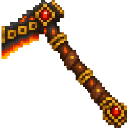
Till, harvest, and replant in a fiery 3×3 sweep with an ancient ember-forged hoe.
Mod Wiki
Emberforge Harvestkeeper
Quickstart
- Craft the Harvestkeeper at a crafting table using the recipe below.
- Hold it and use it on a soil or crop block within 6 blocks. The block you target is the center of the effect.
- Try it on a patch of farmland with ripe crops. Don’t sneak for the full 3×3 sweep; sneak to affect only the targeted block.


Overview
The Emberforge Harvestkeeper is a durable farming tool that tills soil, harvests ripe crops, and can replant them when you have the right planting items. Each use also sends out embers and helps nearby crops grow.
How To Use
The Harvestkeeper works across a horizontal area at the targeted block’s height:
- Normal use: affects a 3×3 area centered on the target.
- Sneaking: limits tilling and harvesting to the targeted block.
It can turn dirt, grass blocks, coarse dirt, rooted dirt, podzol, and mycelium into farmland if the block above is air.
Abilities And Mechanics
- Harvest: Fully grown wheat, carrots, potatoes, beetroot, and nether wart are harvested when within the tilling and harvesting area. Immature crops in that area are left alone.
- Replant: After harvesting, the tool uses one matching item from your inventory to replant the crop at its first growth stage: wheat seeds, carrots, potatoes, beetroot seeds, or nether wart. Without the matching item, the crop is harvested but not replanted.
- Nearby growth: Each use can advance up to two immature supported crops by one growth stage in a 5×5 area at the targeted block’s height.
- Embers: A use emits a brief flame particle at the target.
Crafting And Obtaining
Craft the Harvestkeeper at a crafting table with the recipe shown in Quickstart. In Creative mode, look for it in the Equipment category.
How to install
Download the mod and follow the step-by-step installation guide.
This mod is licensed under the CreativeMode Mods License.