

Description
A turret that fires a lazer and instantly kills a hostile mob.
Mod Wiki
Doombeam Turret
Quickstart
- At a crafting table, place redstone above a beacon and a stone pressure plate below it:


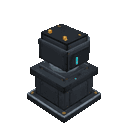
- Place the Doombeam Turret on clear ground with room for a 2×2 footprint and two blocks of height.
- Let a hostile mob come within 18 blocks and into clear line of sight. The turret automatically fires a laser that kills its target instantly; no redstone signal or manual trigger is needed.
You can also find the turret placer in the Creative inventory.
Overview
The Doombeam Turret is an automatic defense turret. It scans for nearby hostile mobs and attacks the nearest one it can see. Its beam is shown with blue particles and a firing sound.
What It Adds
- Doombeam Turret placer: An item used to install the turret.
- Doombeam Turret: A two-block-high structure occupying a 2×2 area.
How To Use
Place the turret where it has a clear view of the area you want to defend. Walls and other solid blocks can block its shots, so open sightlines help it find targets.
The turret operates automatically once placed. It does not need to be equipped, powered, or activated.
Crafting And Obtaining
The standard recipe uses one redstone, one beacon, and one stone pressure plate in a vertical line, as shown in Quickstart.
You can also use these pressure plates in place of the stone plate:
| Pressure plate | Recipe | Pressure plate | Recipe |
|---|---|---|---|
| Acacia | Bamboo | ||
| Birch | Cherry | ||
| Crimson | Dark oak | ||
| Heavy weighted | Jungle | ||
| Light weighted | Mangrove | ||
| Pale oak | Polished blackstone | ||
| Poplar | Spruce | ||
| Warped | Wooden |
Abilities And Mechanics
- Range: Targets hostile mobs up to 18 blocks away.
- Targeting: Chooses the nearest visible hostile mob. Solid blocks can obstruct its line of sight; players are not targets.
- Damage: Each successful shot kills its target instantly.
- Fire rate: It fires about every 10 ticks when there is one visible target, and more quickly—about every 5 ticks—when multiple targets are visible.
Progression And Strategy
Place turrets to cover open approaches, and clear obstructions between the turret and likely mob paths. If an area has several entrances or blocked sightlines, position turrets to cover those separate views.
Breaking any part of the turret removes the whole structure. In Survival, it drops a turret placer; in Creative, it does not.
How to install
Download the mod and follow the step-by-step installation guide.
This mod is licensed under the CreativeMode Mods License.