

Description
Command other players with an overpowered magic staff, then unleash devastating blasts on monsters.
Mod Wiki
Dominion Staff
Quickstart
Craft the staff using the recipe below, then hold it in either hand. Try right-clicking air for a powerful set of combat effects, or use the staff on a nearby player to take control of their movement.


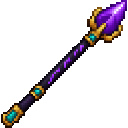
Right-click a non-player living creature to hit it with a devastating blast. While controlling another player, use WASD, Space, your mouse to aim, and attack to make them strike.
Overview
The Dominion Staff is a single, unstackable item with three uses: empowering its wielder, blasting creatures, and commanding another player.
How To Use
- Empower yourself: Right-click air when you are not controlling someone.
- Control a player: Right-click another player within 64 blocks and in the same dimension. You cannot control yourself or a player already bound by someone else.
- Move and aim: While holding the staff in either hand, use WASD, Space, and your mouse. Your aim sets the controlled player’s facing.
- Command an attack: Hold attack to make the controlled player strike the nearest living creature in front of them, within 5.5 blocks. Each strike deals 28 damage and sets the creature on fire for 4 seconds. The controller and controlled player are excluded.
- End control: Right-click air, stop holding the staff, or have the controlled player hold sneak to break free.
Abilities And Mechanics
Right-clicking air outside a control session grants the wielder Strength V, Speed IV, and Resistance III for 30 seconds, plus Regeneration IV for 15 seconds. Right-clicking air during a control session ends it instead.
When used directly on a non-player living creature, the staff deals 100 damage, sets it on fire for 12 seconds, and launches it upward. This is a direct hit, not a projectile.
Crafting And Obtaining
The staff is crafted at a crafting table. Its recipe uses amethyst shards, ender eyes, a nether star, and a blaze rod; see the recipe in Quickstart.
How to install
This Java mod can be used on Windows and Mac PCs with the CreativeMode Launcher or any Minecraft launcher of your choice.

1. Download and install the new CreativeMode Launcher
2. Click to play on the top of the screen.
3. That's it — launches instantly. No complicated setup required.
Want to use on a different launcher? Download mod and manually install.
This mod is licensed under the CreativeMode Mods License.