

Description
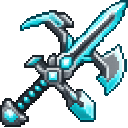
Craft a tireless diamond blade to battle foes and mine stone, ore, and wood.
Mod Wiki
Diamond Titan Omniblade
Quickstart
- In Creative mode, look for the omniblade in the Combat tab. In Survival, craft one using the recipe below.
- Hold it in either hand and try mining blocks or attacking a target. Holding it grants powerful ongoing effects.
- Double-tap Jump to launch into a glide. While gliding, right-click to fire a free firework boost; dive toward an enemy and attack for a stronger hit.
- Right-click suitable dirt blocks with empty space above to turn them into farmland.
Overview
The Diamond Titan Omniblade is an unbreakable, one-of-a-kind weapon and all-purpose mining tool. It can mine blocks suited to pickaxes, axes, shovels, and hoes, and doubles as a gliding launcher and farming tool.
What It Adds
- One Diamond Titan Omniblade, usable in either hand.
- A glide and firework-boost flight ability.
- Broad mining capability and the ability to till certain dirt blocks.
- Powerful effects while the blade is held.
How To Use
- Attack or mine: Left-click enemies or blocks. The blade works on blocks mineable with pickaxes, axes, shovels, and hoes.
- Till soil: Right-click grass blocks, dirt, coarse dirt, or rooted dirt when the block above is air. The block becomes farmland.
- Launch and glide: Double-tap Jump while holding the blade. You can launch without an Elytra.
- Boost: While gliding with the blade, right-click to fire a firework rocket. You don’t need to carry rockets.
- End the glide: Land or stop holding the blade.
Crafting And Obtaining
Craft one omniblade in a crafting table:


Abilities And Mechanics
While held in either hand, the omniblade grants Resistance, Speed, Water Breathing, and Night Vision. It also helps you move faster across soul sand and soul soil.
The glide begins with a small forward launch and continues while you hold the blade in the air. Firework boosts help build speed; diving at an enemy and striking during flight adds a speed-based damage bonus to the mace-style impact.
The blade does not wear out.
Progression And Strategy
Craft the blade as a versatile upgrade for combat, mining, and travel. For stronger aerial attacks, gain height, boost with right-click, then dive toward a target before striking. Remember to land or switch away from the blade to end the glide.
How to install
This Java mod can be used on Windows and Mac PCs with the CreativeMode Launcher or any Minecraft launcher of your choice.

1. Download and install the new CreativeMode Launcher

2. Click to play on the top of the screen.
3. That's it — launches instantly. No complicated setup required.
Want to use on a different launcher? Download mod and manually install.
This mod is licensed under the CreativeMode Mods License.