Description


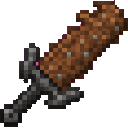
The Deepslate Earthshaker is a powerful, single-stack weapon with two abilities:
It also functions as a strong melee weapon.
| Feature | Details |
|---|---|
| Deepslate Earthshaker | A unique weapon that cannot be stacked |
| Earth blast | Hits living creatures in a 5-block-radius area around the aimed impact point |
| Bedrock cage | Surrounds a targeted player with a temporary bedrock shell |
| Combat weapon | Uses Netherite sword-grade weapon properties |
Hold the Earthshaker's use button, normally right-click, to prepare the blast. Release the button to fire.
The impact point is determined by your aim:
Living creatures within 5 blocks of the impact center:
The blast creates an explosion sound and a burst of particles, but it does not destroy blocks.
After firing, the earth blast has a 15-second cooldown. Trying to use the ability during this cooldown has no effect.
The bedrock ability targets other players rather than general mobs.
The target must be within 32 blocks and must be alive. A successful hit surrounds the player with a bedrock shell approximately 3 blocks wide, 5 blocks tall, and 3 blocks deep.
The cage:
A target already inside an active cage cannot be bedrocked again. If there is no replaceable space around the target, the cage does not form.
The ability requires a torso hit. Aim around the middle of the target rather than at the head, feet, or outer edges.
Craft the Deepslate Earthshaker with dirt and deepslate:
The finished weapon has a maximum stack size of one. Its recipe is automatically available in the recipe book.
The earth blast and bedrock cage use separate cooldowns:
The bedrock cooldown is tied to the player, so obtaining another Earthshaker does not bypass it. The cooldown also remains after relogging or restarting the game.
Both abilities use your view direction and have a maximum range of 32 blocks.
The Deepslate Earthshaker can be used as a melee weapon and has Netherite sword-grade properties. Keep it equipped when switching between melee attacks and its special abilities.
This Java mod can be used on Windows and Mac PCs with the CreativeMode Launcher or any Minecraft launcher of your choice.

1. Download and install the new CreativeMode Launcher

2. Click to play on the top of the screen.
3. That's it — launches instantly. No complicated setup required.
Want to use on a different launcher? Download mod and manually install.
This mod is licensed under the CreativeMode Mods License.

