

Description
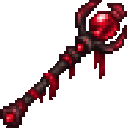
Wield the Crimson Tide Staff and watch nearby waters turn crimson—put it away, and the waters return to normal.
Mod Wiki
Crimson Tide Staff
Quickstart
Craft the staff using the recipe below, then hold it in either hand. Nearby water will appear crimson while you hold it; switch to another item or put the staff away to restore its usual color.
Overview
The Crimson Tide Staff is a visual-effect item. Its tint changes how water looks, not the water itself.
Crafting And Obtaining
The recipe is unlocked when you enter a world. Craft one staff in a crafting table:


Abilities And Mechanics
- The crimson tint is active while the staff is in your main hand or offhand.
- Putting the staff away returns water to its normal appearance.
How to install
This Java mod can be used on Windows and Mac PCs with the CreativeMode Launcher or any Minecraft launcher of your choice.

1. Download and install the new CreativeMode Launcher

2. Click to play on the top of the screen.
3. That's it — launches instantly. No complicated setup required.
Want to use on a different launcher? Download mod and manually install.
This mod is licensed under the CreativeMode Mods License.