300 free coinsevery week

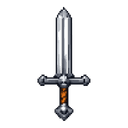
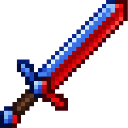
Crimson Azure Blade

v2MC Bedrock
19 downloads

Description

Wield the Crimson Azure Blade, trap, enemies, and ice, and set your enemies on fire

Mod Wiki

Crimson Azure Blade

Quickstart

  1. Gather a red dye, blue dye, diamond, and stick.
  2. Craft the blade at a crafting table:
minecraft:red_dye
minecraft:blue_dye
minecraft:diamond
minecraft:stick
Arrow
com_crimson_azure_blade_ouxgccag:my_sword
  1. Equip the Crimson Azure Blade in your hotbar and attack a living mob or player.
  2. Use either combat mode:
    • Attack normally to set the target on fire for 5 seconds.
    • Sneak while attacking to surround the target with an ice cage.

You can also obtain it from the Creative inventory under Equipment, or use:

/give @s com_crimson_azure_blade_ouxgccag:my_sword

Overview

The Crimson Azure Blade is a powerful sword that combines fire and ice effects. Its attack damage and durability make it useful for regular combat, while its two attack modes let you either burn enemies or trap them in ice.

What It Adds

  • Crimson Azure Blade
    • Attack damage: 7
    • Maximum durability: 500
    • Maximum stack size: 1
    • Supports sword enchantments
    • Can be repaired with iron ingots
  • Fire combat mode
    • Sets living targets on fire for 5 seconds.
  • Ice cage combat mode
    • Builds an ice cage around the struck target.

How To Use

Normal Attack: Crimson Power

Attack a living target without sneaking to ignite it for 5 seconds. This mode is useful for dealing additional damage over time while keeping your movement unrestricted.

Sneaking Attack: Azure Power

Hold the sneak control while striking a living target to create an ice cage around it. The cage surrounds the target with ice walls and a roof, restricting its immediate movement.

The cage is created around the target’s position and can remain in the world after the attack. Mine the ice afterward if you want to clear the area.

The blade’s special effects affect living targets, such as players and mobs. They do not apply to non-living targets such as dropped items or item frames.

Crafting And Obtaining

Craft the Crimson Azure Blade at a crafting table using:

  • 1 red dye
  • 1 blue dye
  • 1 diamond
  • 1 stick

The recipe becomes available after you have the required ingredients. In Creative mode, the blade is available in the Equipment category.

Abilities And Mechanics

PropertyEffect
Attack damage7
Durability500
Normal hitIgnites a living target for 5 seconds
Sneaking hitCreates an ice cage around the target
Stack size1
EnchantmentsCompatible with sword enchantments
Repair materialIron ingots

Each iron ingot can repair up to 125 durability when used as a repair material.

Progression And Strategy

  • Use normal attacks against exposed enemies when you want to apply burning damage.
  • Use sneaking attacks to contain dangerous mobs or hold a target in place.
  • Create ice cages before repositioning, healing, or preparing a follow-up attack.
  • Avoid using the ice mode near valuable builds, since it places ice blocks around the target.
  • Keep iron ingots available for repairs during extended battles.
  • Enchant the blade like a sword to improve its combat performance.

How to install

Download the mod and follow the step-by-step installation guide.
Players also liked

Flame Core – image 1
190MC Bedrockv2

Flame Core

Wield the Flame Core to unleash a devastating beam of fire with a right-click, incinerating enemies and setting blocks ablaze along its path. After each shot it pulses with swirling embers as it recharges for three seconds before you can fire again. Its enchanted glow and pink-ti…

Crowned Zombie Guardian – image 1
168MC Bedrockv1

Crowned Zombie Guardian

The Crowned Zombie Guardian is a formidable undead ally that stands twice as tall as a regular zombie. Unlike its hostile counterparts, this gentle giant sports a pale pinkish-white complexion rather than the typical zombie green. Its most distinctive feature is the magnificent d…

Color Portal Vent – image 1
339MC Bedrockv3

Color Portal Vent

Color Portal Vent is a placeable block that you dye by holding any vanilla dye in your hotbar and interacting with it. Once you’ve placed and dyed two vents the same color, simply sneak on top of one to instantly teleport to the other—perfect for hidden passages, shortcuts, or th…

This mod is licensed under the CreativeMode Mods License.