


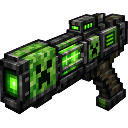
Description
Wield a Creeper railgun that fires devastating, long-range green laser beams.
Mod Wiki
Creeper Beam Cannon
Quickstart
- Craft the Creeper Beam Cannon using the recipe below.
- Equip it in your main hand.
- Right-click (or use the interact button) to start charging — you'll see a green particle buildup and hear a charging sound.
- Wait and release, or tap the interact button again for a quick shot, to fire a devastating green laser beam.
- Aim at enemies or blocks — the beam pierces through multiple targets and can blow apart terrain.
Overview
The Creeper Beam Cannon is a rare, sword-like ranged weapon that channels Creeper energy into a piercing green laser. Charge it up for a more powerful, longer-range blast, or fire quickly for a weaker instant shot. It deals heavy damage, knocks enemies back, punches through multiple targets in a line, and can occasionally blast blocks apart with explosive force.
What It Adds
- Creeper Beam Cannon — a single custom melee/ranged hybrid weapon with a laser-firing ability.
Crafting And Obtaining
Craft the cannon at a crafting table using gunpowder, a creeper head, a redstone block, iron ingots, and an emerald block:
How To Use
- Equip the cannon in your main hand like a sword.
- Charge: Right-click/interact once to begin charging. A green particle effect builds around your head and a rising charge sound plays.
- Fire:
- Tap the interact button a second time while charging to release the beam immediately at your current charge level (great for a fast, weaker shot).
- Or hold off and let it auto-fire once fully charged (about 3 seconds).
- Cooldown: After firing, the cannon needs about 5 seconds to recharge before it can be charged again. An on-screen message shows the remaining cooldown time if you try to use it too soon.
- Moving while charging is slowed slightly, so brace yourself before firing.
Abilities And Mechanics
- Charge scaling: The longer you charge (up to full charge), the more damage and range the beam gets:
- Damage scales from a solid base hit up to a devastating maximum.
- Range scales from a respectable distance up to an extremely long-range blast.
- Piercing beam: The laser can strike and damage multiple enemies in a line, not just the first one it hits.
- Knockback: Anything hit by the beam is thrown backward and slightly upward.
- Block damage: There's a chance the beam will blast apart the block it hits, sometimes with an explosive burst that breaks nearby blocks too.
- Durability as ammo: Each shot consumes some of the weapon's durability. Once durability runs out, the cannon breaks, so keep an eye on its condition.
- Repairing: Restore durability using emeralds (moderate repair) or diamonds (larger repair) at an anvil or crafting-based repair.
- Enchanting: The cannon can be enchanted like a bow, so bow-related enchantments can be applied to it.
Progression And Strategy
- Use quick taps for fast, lower-damage shots when you need to react quickly or conserve durability.
- Hold the charge for maximum range and damage when facing tough enemies or striking from a distance.
- Because the beam pierces multiple targets, line up shots against groups of enemies for maximum effect.
- Keep diamonds or emeralds on hand to repair the cannon between fights, since every shot chips away at its durability.
- Respect the cooldown — plan your shots rather than spamming the trigger, since the weapon won't fire again until it has recharged.
How to install
Download the mod and follow the step-by-step installation guide.
This mod is licensed under the CreativeMode Mods License.