

Description
OP god sword can put u in creative by holding it and has crazy enchantments including Java once and u can toggle creative mode
Mod Wiki
Creative Godblade
Quickstart
Craft the Creative Godblade at a crafting table:


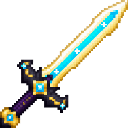
Select it in your hotbar and hold it to enter Creative mode. Use the blade to switch between Creative and Survival. If you use it to return to Survival, put it away and select it again before holding it to re-enable its automatic Creative effect.
Overview
The Creative Godblade is a powerful sword with an automatic Creative-mode effect and a manual mode toggle. It also gains a set of strong enchantments when held.
What It Adds
- Creative Godblade: A hand-held sword with 50 attack damage and 100,000 durability.
- Automatic enchantments: While held, it gains Sharpness V, Looting III, Fire Aspect II, Knockback II, Unbreaking III, and Mending I.
How To Use
- Hold it: Selecting the blade puts you in Creative mode automatically, unless you are already in Creative or Spectator.
- Use it: Activate the blade’s use action to switch between Creative and Survival.
- Re-arm the automatic effect: After using the blade to switch to Survival, put it away and select it again. Simply continuing to hold it will not immediately switch you back.
Crafting And Obtaining
Craft the blade at a crafting table with a Nether Star, Netherite Ingot, and Stick arranged as shown in the recipe above.
How to install
Download the mod and follow the step-by-step installation guide.
This mod is licensed under the CreativeMode Mods License.