

Description
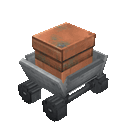
Ride the rails in a copper cart with room for all your treasures.
Mod Wiki
Copper Chestcart
Quickstart
Craft a Copper Chestcart from four copper ingots, a chest, and a minecart (see the recipe below). Place rails, then use the cart item on a rail to spawn the cart.
Try sneaking and using the cart to open its chest inventory, then use it normally to board and ride. Powered rails can help get it moving.
Overview
The Copper Chestcart is a chest minecart with a copper-themed appearance. It carries items while traveling on rails and can hold one rider.
How To Use
- Place it: Use the Copper Chestcart item on a rail. It won’t place on ordinary ground.
- Open storage: Sneak and use the cart to access its chest inventory.
- Ride: Use the cart normally to board it. Only one passenger can ride at a time.
- Travel: The cart follows minecart rail behavior, including slopes, powered rails, and braking.
- Dismounting: Shift does not dismount you from this cart.
Crafting And Obtaining
The Copper Chestcart is also available in the Creative inventory under Functional Blocks.


How to install
This Java mod can be used on Windows and Mac PCs with the CreativeMode Launcher or any Minecraft launcher of your choice.

1. Download and install the new CreativeMode Launcher

2. Click to play on the top of the screen.

3. That's it — launches instantly. No complicated setup required.
Want to use on a different launcher? Download mod and manually install.
This mod is licensed under the CreativeMode Mods License.