

Description
Pick your cape and wear Aurora, Ember, Tide, or Meadow on your next adventure.
Mod Wiki
Cape Wardrobe
Quickstart
- Craft a Cape Wardrobe from leather, or find it in the Functional section of the Creative inventory.
- Hold it and use (right-click) to open the cape selector.
- Choose Aurora, Ember, Tide, or Meadow, then select Close. Your choice appears on your character without equipping the item.
What It Adds
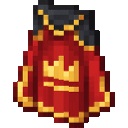
Cape Wardrobe is a reusable item for choosing between four cosmetic capes:
| Cape | Appearance |
|---|---|
| Aurora | Teal |
| Ember | Red and orange |
| Tide | Blue |
| Meadow | Green |
How To Use
Use the item again whenever you want to open the selector and choose a different cape. Your current selection is marked in the menu.
Crafting And Obtaining
The recipe is unlocked automatically. Craft the wardrobe with seven leather:


Abilities And Mechanics
The selected cape is a client-side cosmetic: it appears on your character for you and does not change your account skin. Your selection lasts for the current game session and starts at Aurora next session. If your character already has an official cape, that cape takes precedence and the wardrobe cape is hidden.
How to install
This Java mod can be used on Windows and Mac PCs with the CreativeMode Launcher or any Minecraft launcher of your choice.

1. Download and install the new CreativeMode Launcher

2. Click to play on the top of the screen.
3. That's it — launches instantly. No complicated setup required.
Want to use on a different launcher? Download mod and manually install.
Players also liked
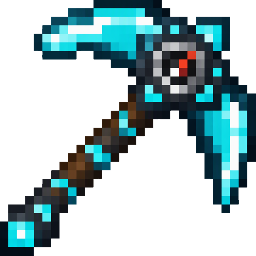
Diamond Seeker Pickaxe


Reveal nearby diamonds and ancient debris through stone with your trusty pickaxe. hope you guys like it
This mod is licensed under the CreativeMode Mods License.