

Description
The most powerful sword in Minecraft Java history.
Mod Wiki
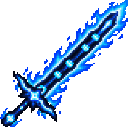
Bluefire God Sword
Quickstart
Craft the sword using the recipe below, or find it in the Creative inventory’s Combat tab. Hold it in your main hand and try:
- Left-click / Attack: swing as normal and unleash a bluefire burst at the block you’re aiming at, or ahead of you if you aren’t aiming at a block.
- Right-click / Use: strike nearby enemies with bluefire.
- Pick Block (middle mouse by default): excavate a cluster around the block you’re aiming at.
The abilities have cooldowns, so wait a few seconds between uses.
Overview
The Bluefire God Sword is a single, unbreakable-in-count sword item with heavy melee damage and three special abilities. Ordinary hits also set targets on fire.
What It Adds
- The Bluefire God Sword, which always glints and is available in the Combat Creative inventory tab.
- A targeted bluefire burst, an area strike, and cluster excavation.
How To Use
Keep the sword in your main hand to activate its abilities. The burst can reach a block up to 12 blocks away; it creates a contained blast effect without breaking blocks. If no block is in range, it appears ahead of you.
The strike hits up to eight living targets within six blocks, excluding you and your teammates. It deals heavy damage and sets hit targets on fire.
To excavate, aim at a block within six blocks and press your Pick Block key. The sword can break up to 18 nearby blocks in a 3×3×3 cluster, provided they can be harvested and aren’t unbreakable. Broken blocks drop items normally. Excavation requires permission to modify the world and only starts a cooldown if it breaks at least one block.
Crafting And Obtaining
Craft one sword in a crafting table:


Burst and excavation have a five-second cooldown; the strike has a three-second cooldown. These cooldowns apply to the sword’s abilities.
How to install
This Java mod can be used on Windows and Mac PCs with the CreativeMode Launcher or any Minecraft launcher of your choice.

1. Download and install the new CreativeMode Launcher

2. Click to play on the top of the screen.

3. That's it — launches instantly. No complicated setup required.
Want to use on a different launcher? Download mod and manually install.
This mod is licensed under the CreativeMode Mods License.