

Description
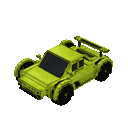
Build your racer, hop in, and speed across the ground with hands-on driving controls.
Mod Wiki
Blazing Bull Racer
Quickstart
- Craft the racer using the recipe in Crafting And Obtaining.
- Place it in a clear area; its model spreads across roughly a 4×4×4 space and faces according to your direction.
- Right-click any part of the placed racer to climb in and drive.
- Use W to accelerate, S to slow down and eventually reverse, A/D to steer, and Left Ctrl to get out.
Overview
Blazing Bull Racer is a ground vehicle you assemble by placing its racer item. The placed model becomes a rideable racer when you interact with it.
What It Adds
- A placeable Blazing Bull Racer model made of multiple connected parts.
- A drivable vehicle with speed and heading readouts while you ride.
How To Use
- Place: Set down the racer item in a clear space. The model’s parts are placed automatically and oriented to your facing.
- Ride: Right-click any part of the placed model. You’ll mount the racer, and the placed parts disappear as it becomes a vehicle.
- Drive: Hold W to accelerate. Hold S to slow down; keep holding to travel in reverse. A and D turn left and right. Releasing the drive keys lets the racer coast to a stop.
- Exit: Press Left Ctrl.
- Recover: Damaging the moving racer removes it and drops a racer item.
Your view switches to third-person while riding and returns to your previous perspective when you dismount. The riding HUD shows speed and heading.
Crafting And Obtaining
Craft the racer from iron ingots, redstone, leather, a gold ingot, and iron nuggets:


How to install
This Java mod can be used on Windows and Mac PCs with the CreativeMode Launcher or any Minecraft launcher of your choice.

1. Download and install the new CreativeMode Launcher
2. Click to play on the top of the screen.
3. That's it — launches instantly. No complicated setup required.
Want to use on a different launcher? Download mod and manually install.
This mod is licensed under the CreativeMode Mods License.