


Description
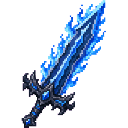
Azure Leapblade: a massive sword wreathed in blue flames. Interact to perform a 10-block vertical leap; on landing it slams the ground dealing high area damage, strong knockback to nearby mobs, and ignites them. While the sword is in the hotbar the wielder suffers Slowness; while actively held it grants Sharpness V. High-risk, high-reward melee weapon with an area slam ability.
Mod Wiki
Azure Leapblade
Quickstart
- Craft the Azure Leapblade using the recipe below, then move it to your hotbar.
- Hold it in your hand and press the Use/Interact button (right-click on Java-style controllers, or the interact button on touch/gamepad) to launch yourself ~10 blocks into the air.
- When you land, the sword automatically slams the ground — nearby mobs take heavy damage, get blasted back, and are set on fire.
- The leap has a 5-second cooldown; your action bar will display the remaining time if you try to leap early.
Overview
The Azure Leapblade is an epic-rarity melee weapon for Minecraft Bedrock Edition (1.21.93). It is a massive sword wreathed in blue flames that rewards aggressive, high-risk play. A single bound can carry you over a crowd of mobs and punish the entire group on landing, but carrying the blade at all will slow you down. Mastering the leap timing and positioning is the key to using it effectively.
What It Adds
| Detail | Value |
|---|---|
| Item ID | com_azure_leapblade_33i3iyob:my_sword |
| Rarity | Epic (aqua name, enchantment glint) |
| Base damage | 9 |
| Durability | 1,561 uses |
| Enchantability | Sword slot, enchantability 10 |
Abilities And Mechanics
Azure Leap (Use/Interact)
Pressing the interact button while holding the sword launches you approximately 10 blocks straight up. On landing — provided you fell at least a short distance — the sword slams the ground, triggering all of the following simultaneously:
- Area damage — every mob within 5 blocks takes 12 points of damage.
- Strong knockback — affected mobs are blasted away horizontally and upward from the impact point.
- Ignition — fire is placed on each struck mob, and a ring of fire erupts around the impact site.
- Visual & sound effect — a blue-flame particle burst and a rumbling sound play at the landing point.
The leap has a 5-second cooldown (shared across uses). A message on your action bar confirms the leap or tells you how many seconds remain on the cooldown.
Passive Effects
These effects apply automatically based on where the sword is:
| Condition | Effect |
|---|---|
| Sword is anywhere in your hotbar (slots 1–9) | Slowness II — constantly refreshed, no particles |
| Sword is actively held in your main hand | Strength V — boosts all melee damage, no particles |
Note: The Slowness penalty applies even when the sword is not in your hand — just having it in your hotbar is enough. To avoid the penalty, store it in your inventory outside the hotbar when not in combat.
Crafting And Obtaining
Craft the Azure Leapblade at a crafting table:
Repairing
The Azure Leapblade can be repaired at an anvil:
- Diamond — restores ~390 durability per diamond
- Netherite Ingot — restores ~780 durability per ingot
It can also be enchanted in the sword enchantment slot (enchantability 10).
Progression And Strategy
- Opening a fight: Leap into the center of a mob group to deal immediate AoE damage, knockback, and fire to all of them at once, then follow up with normal attacks powered by the Strength V bonus.
- Slowness trade-off: The Slowness II debuff makes kiting and retreating very dangerous. Commit to aggressive close-range play, or swap the sword out of your hotbar between encounters.
- Cooldown management: The 5-second leap cooldown means you should save the ability for grouped or dangerous targets rather than single mobs.
- Vertical mobility: The leap can also be used to reach elevated terrain quickly or to escape tight spots, even if no mobs are present — the slam simply won't trigger if you land without sufficient fall distance.
- Durability: Every hit costs durability at a 100% rate. Keep diamonds or netherite ingots on hand for anvil repairs during longer expeditions.
How to install
Download the mod and follow the step-by-step installation guide.
This mod is licensed under the CreativeMode Mods License.