

Description
Build custom armies, name your mobs, craft Battle Cores and Charges, and unleash battles anywhere.
Mod Wiki
Automated Minecraft Battle Machine
Quickstart
- Craft a Battle Machine Controller and, optionally, some Battle Charges. The controller can start battles by itself.
- Hold the controller and sneak-use it to open the AMBM console.
- Select Configure Left Force or Configure Right Force to choose mob types and quantities. The default setup is:
- Left Force: 6 Zombies and 3 Skeletons
- Right Force: 5 Pillagers and 2 Vindicators
- Use the controller on a block without sneaking to deploy the configured armies. They appear on opposite sides of the target and begin fighting after a 4-second countdown.
- To use a Battle Charge, hold it and use it on a block. One valid deployment consumes one Charge.
- After the countdown, the mobs use vanilla AI. Watch the battle, then check the winner message and fireworks when one side is defeated.
Overview
Automated Minecraft Battle Machine lets you create two custom forces from supported Minecraft mobs and deploy them at a chosen location. You can name the forces, show name tags, give the mobs glowing outlines, build a temporary arena structure, save army presets, or deliver the armies as spawn eggs instead of starting an automated battle.
The controller stores your selected forces and settings for your player.
What It Adds
| Item | Use |
|---|---|
| Battle Machine Controller | Opens the AMBM console while sneaking and deploys the configured mode when used on a block |
| Battle Core | Advanced crafting ingredient for the Battle Machine Controller |
| Battle Charge | Deploys the configured forces when used on a block; one Charge is consumed for a valid use |
The Battle Machine Controller and Battle Charge are items, not placeable blocks.
How To Use
Opening the Console
Hold the Battle Machine Controller and sneak-use it. You can use it in the air or on a block while sneaking.
The console displays:
- The names of both forces
- Mob counts for each side
- A rough power estimate for each side
- The current deployment mode
- Configuration and utility options
Deploying a Live Battle
Use the controller on a block without sneaking while Live Battle mode is selected.
The mod:
- Checks that at least one mob is configured.
- Spawns the two forces on opposite sides of the target.
- Builds an arena if arena walls are enabled.
- Starts a 4-second countdown.
- Releases the mobs to vanilla AI.
The controller is not consumed. Live deployments are blocked when the combined army contains more than 1,000 mobs.
Using Battle Charges
Use a Battle Charge on a block to deploy the currently selected mode.
- In Live Battle mode, it starts the configured battle.
- In Spawn-egg delivery mode, it gives you spawn eggs for the configured mobs instead.
- A valid use consumes one Battle Charge.
- Using a Charge in the air displays a reminder to use it on a block.
The controller can also deploy either mode without consuming a Charge.
Configuring Forces
Choose one of the two force configuration buttons in the console. Each editor provides:
- A Mob type selector
- A quantity from 0 to 1,000
- A toggle to remove every mob from that side
Setting a mob’s quantity to 0 removes that mob type from the force. The combined live-battle limit is 1,000 mobs.
Personalizing Forces
Personalize Forces lets you:
- Set a name for the left force
- Set a name for the right force
- Show or hide mob name tags
- Give AMBM mobs glowing outlines
Force names can contain up to 24 characters. When name tags are enabled, mobs display their force name and mob type.
Console Utilities
| Option | Effect |
|---|---|
| Copy Left → Right | Replaces the right force with a copy of the left force |
| Randomize Armies | Generates two random forces using supported mob types |
| Mode: Start Live Battle / Give Spawn Eggs | Switches between battle deployment and spawn-egg delivery |
| Arena Walls: ON/OFF | Controls whether a stone-and-glass arena is created at deployment |
| Presets | Save or load up to eight army pair presets |
| Give Current Army Eggs | Places spawn eggs for both configured forces in your inventory |
| Clear AMBM Mobs | Removes all AMBM battle mobs in your current dimension |
| Last Battle Stats | Displays the most recently completed battle result |
Presets save the two army configurations. Personalization and arena settings are managed separately.
Supported Mob Types
The mob selector includes:
- Allay, Armadillo, Axolotl, Bat, Bee, Blaze, Camel, Cat, Cave Spider, Chicken, Cod, Cow, Creeper
- Dolphin, Donkey, Drowned, Elder Guardian, Ender Dragon, Enderman, Endermite, Evocation Illager, Fox, Frog, Ghast
- Glow Squid, Goat, Guardian, Hoglin, Horse, Husk, Iron Golem, Llama, Mooshroom, Mule, Ocelot, Panda
- Parrot, Phantom, Pig, Piglin, Piglin Brute, Pillager, Polar Bear, Pufferfish, Rabbit, Ravager, Salmon
- Sheep, Shulker, Silverfish, Skeleton, Slime, Sniffer, Snow Golem, Spider, Squid, Stray, Strider, Tadpole
- Tropical Fish, Turtle, Vex, Vindicator, Wandering Trader, Warden, Witch, Wither, Wither Skeleton, Wolf
- Zoglin, Zombie, Zombie Horse, Zombie Villager, and Zombified Piglin
Some special entities may fail to spawn in a particular deployment. Other configured mobs continue spawning normally.
Abilities And Mechanics
Countdown and Combat
Every live deployment has a 4-second charging period. When the countdown ends, the mobs are released and vanilla AI controls their movement and attacks.
The mod does not directly command individual mobs during combat. Matchups involving passive, neutral, flying, aquatic, or special mobs may behave differently depending on the location and the mobs involved.
Battle Results
A battle ends when one side has no remaining AMBM mobs.
The game announces:
- The winning force
- How many mobs remain on each side
- The starting size of both forces
Fireworks appear at the battle location. If both sides are eliminated, the result is recorded as No Force.
Arena Walls
Arena Walls are enabled by default. When enabled, deployment creates:
- A 41-by-41 stone floor
- Glass walls around the edges
- Walls three blocks high
The arena is centered on the block used for deployment. Its blocks replace existing blocks in the affected area, and the arena remains after the battle ends.
Automatic Cleanup
Finished battle mobs are automatically removed about 30 seconds after the battle ends. The Clear AMBM Mobs option can remove AMBM battle mobs immediately in the current dimension.
Crafting And Obtaining
All three items are crafted at a crafting table.
Battle Charge
A Battle Charge crafts four Charges from blaze powder, redstone, an iron ingot, and a copper ingot.


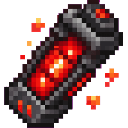
Battle Charges stack up to 16.
Battle Core
A Battle Core requires redstone, diamonds, and an amethyst shard.


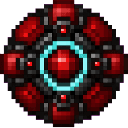
Battle Cores stack up to 64.
Battle Machine Controller
The controller requires iron blocks, redstone blocks, observers, and a Battle Core.


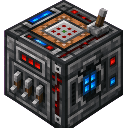
Only one Battle Machine Controller can occupy an inventory stack.
Progression And Strategy
- Start with the default armies to confirm that your deployment area is safe.
- Keep the combined live army at or below 1,000 mobs.
- Use force names and name tags when running several battles in the same area.
- Enable glowing outlines if mobs are difficult to see in crowded arenas or at night.
- Use the arena option in a prepared area because its stone floor and glass walls overwrite blocks.
- Try copying one force and changing only a few mob types to compare matchups.
- Save effective army combinations in the eight preset slots.
- Use spawn-egg delivery mode when you want to arrange the forces manually or experiment with mobs outside the automated battle area.
- Passive and special mobs may not behave like dedicated fighters, so test unusual combinations before committing to large armies.
How to install
Download the mod and follow the step-by-step installation guide.
This mod is licensed under the CreativeMode Mods License.