Description
Build, break, and move your UMF without losing upgrades, now with more mobs to buy.
Mod Wiki
Advanced Spawner Universal Mob Foundry Umf
Quickstart
- Craft the Universal Mob Foundry (UMF) using the recipe below.
- Place it on the ground where you want a mob farm.
- Right-click / interact with the block to open its management menu.
- Spend in-game currency (earned from the foundry's own mob drops) to unlock and select mobs to spawn.
- Stand back and let it run — it periodically spawns mobs and collects their drops for you, or funnels loot into a hopper placed underneath it.
- When you want to relocate it, break it with Save on Break enabled so your levels and purchases carry over to the next one you place.
Overview
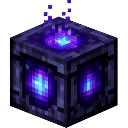
The Universal Mob Foundry is a single, glowing crafted block that acts as an all-in-one mob farm. Instead of building elaborate mob grinders, you place one UMF block, unlock mobs from a built-in catalog, and let it passively simulate spawning and looting for you. It levels up over time, unlocking access to rarer and more valuable mobs, and it can be safely broken and moved without losing your progress.
What It Adds
- Universal Mob Foundry block – the core placeable device that spawns and "loots" mobs automatically on a timer.
- UMF Placer item – the crafted item used to place the foundry block.
- A management menu – opened by interacting with the block, used to buy mobs, view your loot, and configure settings.
- A large mob catalog spanning Common, Uncommon, and Rare rarities, each with its own purchase cost, level requirement, and unique drop table.
- Hopper support – place a hopper beneath the foundry to automatically collect its output.
Crafting And Obtaining
Craft the UMF Placer item at a crafting table:
Placing this item in the world creates the Universal Mob Foundry block. The block glows softly and can be mined like a normal block (takes a few seconds to break).
How To Use
- Interact with the placed foundry to open its menu, where you can:
- Browse available mobs by rarity.
- Spend currency to unlock new mobs for the foundry to "spawn."
- View and manage the loot the foundry has accumulated.
- Toggle settings such as bottled experience loot and save-on-break behavior.
- The foundry ticks continuously in the background, simulating spawns for every mob you've unlocked and adding their drops to its internal inventory.
- Place a hopper directly beneath the foundry to have it automatically funnel collected loot into the hopper (and from there into chests, other hoppers, etc.).
- Breaking the block with the save option enabled packages its level and mob selections so that placing a new UMF restores everything instantly — no need to re-buy mobs or relevel from scratch.
Progression And Strategy
- The foundry has a level that increases as you use it, capped initially around level 15 for the base tier, with further growth possible up to level 35 through continued play.
- Higher levels unlock access to more valuable and rarer mobs:
| Rarity | Unlocks At Level | Example Mobs | Notes |
|---|
| Common | 1+ | Chicken, Pig, Cow, Sheep, Armadillo, Mooshroom, Squid | Cheap to unlock, basic resources (food, wool, ink) |
| Uncommon | 3+ | Zombie, Husk, Skeleton, Stray, Spider, Cave Spider, Pillager, Drowned, Glow Squid | Combat-related drops: bones, arrows, string, rare chances at gear like crossbows and tridents |
| Rare | 5+ | Creeper, Bogged, Enderman, Zombie Piglin, and more | Higher costs, valuable or unique drops such as gunpowder and ender pearls |
- Each mob has its own purchase cost paid from the loot/currency the foundry generates — spend early income on cheap Common mobs, then reinvest into unlocking Uncommon and Rare mobs as your level rises.
- Some drops (like enchanted gear or gemstones) only have a chance to appear, so unlocking more mobs increases the variety and value of what your foundry produces over time.
- Because the foundry's progress (level, unlocked mobs, and settings) can be saved when broken, you can freely relocate it to a better base or farm layout without losing your investment.
This mod is licensed under the CreativeMode Mods License.