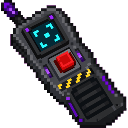
Overview
Word Eater adds a single powerful tool — the World Eater Remote — that can erase any rectangular region of your world completely, from the top corner you select all the way down to the lowest point of the dimension. Bedrock, water, lava, and everything else in the selection is replaced with air, leaving an open void. The process is animated with explosion particles and sounds as each Y-level is cleared, and a temporary grey machine hovers above the active work zone while it runs.
What It Adds
| Item | Description |
|---|
| World Eater Remote | A hand-held tool used to select two corners and erase the region between them down to the void. Max stack size: 1. Durability: 500. |
How To Use
Selecting Your Region
The remote works by defining two opposite corners of a box:
- Use on a block → sets Corner A (first use) or Corner B (second use).
- Sneak + Use on a block → always forces a re-set of Corner A, regardless of which corner was next.
- Both corners must be set before activation is possible. Your current corner status is shown on your action bar after each interaction.
The Y-coordinate of the higher corner becomes the top of the removal zone. The bottom is always the minimum Y of the current dimension (e.g. Y = −64 in the Overworld).
Activating the Remote
- Use in the air (aim at the sky, not a block) while both corners are set → starts the removal.
- The remote must be in your hand when you activate it. Durability is consumed at activation; larger regions cost more durability. With 500 max durability, you can run multiple operations before the remote breaks, though very large areas may consume most or all of it in one go.
During the Operation
- A temporary grey machine structure hovers 15 blocks above the Y-level currently being removed and moves downward as each level is cleared.
- Explosion particles spread across the full X/Z footprint of the selection at each level.
- Explosion sounds play centered on the active area.
- The operation runs between approximately 0.5 and 120 seconds depending on the size of the selected region.
- Blocks are removed in batches (up to 60 blocks per Y-level per tick), so very large selections take longer but remain smooth.
Completion
- When finished, a large explosion effect fires at the center of the cleared area.
- Your action bar and chat display: "World Eater removal complete. The selected area now falls to the void."
- All temporary machine blocks are automatically removed.
Crafting And Obtaining
Craft the World Eater Remote at a crafting table:
The recipe requires Iron Ingots, Redstone, an Eye of Ender, and a Nether Star. The recipe unlocks automatically once you have Redstone, an Eye of Ender, or a Nether Star in your inventory.
Abilities And Mechanics
- Removes all block types including bedrock, water, flowing water, lava, and flowing lava.
- Region depth is always full — from your selected top Y down to the dimension's minimum Y, not just between the two corners vertically.
- Durability scales with region size — small selections use very little durability; enormous selections may consume the majority of the remote's 500-point durability pool.
- Duration scales with region size — from as fast as ~0.5 seconds for tiny areas up to ~120 seconds for massive ones.
- Sneak-use override — holding Sneak while using the remote on a block always resets Corner A, letting you redefine your selection without starting over from scratch.
- The remote stacks to 1 and is equipped as a hand item.
Progression And Strategy
- Start small. Select a modest area first to get a feel for how corners are set and how the removal looks before committing to a large operation.
- Plan for depth. Because removal always goes to the void floor, even a small X/Z footprint will create a very deep pit. Make sure nothing important is below your selection that you want to keep.
- Watch your durability. Larger regions consume more durability. If you have several removals planned, prioritize smaller or more critical ones first. You can craft additional remotes if needed.
- Use Sneak-Use to correct mistakes. If you place Corner A in the wrong spot, sneak-use on the correct block to reposition it before setting Corner B.
- Operations run in the background. You can move away from the area while the remote works — the machine and particle effects will continue until complete.