

Description
Wild Shape Cloak adds a craftable Identity Cloak that lets you assume the form of wild mobs: use the cloak on a living wild mob to begin a five-minute wild shape where you turn invisible and a silent, invulnerable no-AI copy of that mob follows you as your visible disguise while mob-family effects are applied. Sneak-right-clicking the cloak or using the /wildshape clear command ends the transformation early, and you can check your state with /wildshape status or get usage help with /wildshape help; the mod also gives periodic remaining-time feedback while transformed. Craft the cloak at a crafting table using common components like leather, amethyst shard, string, and emerald (the recipe appears in your recipe book), and in creative mode the cloak is available in its own Wild Shape Cloak creative tab for easy access.
Mod Wiki
Wild Shape Cloak
Quickstart
- Craft the Identity Cloak at a crafting table (recipe unlocks once you have leather, amethyst shard, string, or emerald in your inventory — check your recipe book):


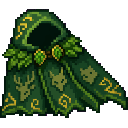
- Hold the Identity Cloak in your hand and right-click a wild mob (any living mob that isn't tamed or player-controlled).
- You turn invisible and a silent, invulnerable copy of that mob appears as your disguise — your wild shape has begun!
- To end it early, sneak + right-click the cloak, or run
/wildshape clear.
In Creative mode, find the Identity Cloak in the Wild Shape Cloak creative tab.
Overview
Wild Shape Cloak lets you disguise yourself as almost any mob in the world. Right-click a creature with the Identity Cloak and you slip into its form for five minutes: you become invisible while a perfect, harmless copy of the mob shadows you as your visible shell. During the transformation, effects tied to that mob family are applied to you automatically.
What It Adds
| Item | Description |
|---|---|
| Identity Cloak | A craftable cloak used to assume the form of a wild mob |
The mod also adds a dedicated Wild Shape Cloak creative tab containing the Identity Cloak.
How To Use
Starting a Wild Shape
- Hold the Identity Cloak in either hand.
- Right-click directly on any wild living mob.
- If the target is a valid wild mob, the transformation begins immediately.
- You become invisible and an invulnerable, no-AI, silent copy of the mob follows you as your disguise.
- The shape lasts 5 minutes. You'll receive periodic chat messages showing the remaining time.
Ending a Wild Shape
- Sneak + Right-click with the Identity Cloak in hand to cancel immediately.
- Run
/wildshape clearto end the transformation via command.
Checking Your Status
/wildshape status— displays whether you are currently transformed and how much time remains./wildshape help— shows command usage help in chat.
Crafting And Obtaining
Craft the Identity Cloak at any crafting table. The recipe is automatically unlocked in your recipe book once you pick up any of the required materials.
Materials needed:
- Leather
- Amethyst Shard
- String
- Emerald
In Creative mode, the Identity Cloak is found in the Wild Shape Cloak tab.
Abilities And Mechanics
- Invisibility — While transformed, you are fully invisible to other players and mobs.
- Mob Disguise — A silent, invulnerable, AI-disabled copy of the target mob follows your position as your visible form.
- Mob-Family Effects — Relevant status effects are applied to you based on the type of mob you've copied.
- Duration — Each wild shape lasts exactly 5 minutes. Periodic reminders count down your remaining time.
- Target Restriction — Only wild living mobs can be copied. Tamed animals and non-living entities are not valid targets; attempting to use the cloak on them will display an error message.
Progression And Strategy
- The crafting materials are mid-game accessible: leather from cows, string from spiders, amethyst shards from geodes, and a single emerald from trading or mining.
- Use wild shapes to infiltrate mob areas without drawing aggression — approach hostile mobs while disguised as a neutral creature.
- Plan around the 5-minute limit; use
/wildshape statusto check how much time you have left before committing to a long expedition. - Sneak + right-click is the fastest way to drop a shape if your cover is about to be blown.
- The cloak is reusable — one item lets you shift between any wild mob shapes as many times as you like.
How to install
This Java mod can be used on Windows and Mac PCs with the CreativeMode Launcher or any Minecraft launcher of your choice.

1. Download and install the new CreativeMode Launcher

2. Click to play on the top of the screen.

3. That's it — launches instantly. No complicated setup required.
Want to use on a different launcher? Download mod and manually install.
This mod is licensed under the CreativeMode Mods License.