


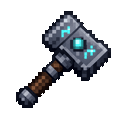
Description
The Wanderforge Hammer is a magical tool that allows you to instantly relocate entire buildings. Right-click on any block to set the first corner of your selection, then right-click on a second block to define the opposite corner—the selected region's coordinates and size will appear in your action bar. Once both corners are set, Shift+Right-click on any block to teleport the entire building to that new location, where it will be placed on top of the block you clicked. The hammer preserves all block types, orientations, and even the contents of containers like chests and furnaces during the move. You can relocate buildings up to 48x48x48 blocks in size, and the hammer has 256 durability with a 3-second cooldown between moves to prevent overuse.
How to install
This Java mod can be used on Windows and Mac PCs with the CreativeMode Launcher or any Minecraft launcher of your choice.

1. Download and install the new CreativeMode Launcher

2. Click to play on the top of the screen.
3. That's it — launches instantly. No complicated setup required.
Want to use on a different launcher? Download mod and manually install.
This mod is licensed under the CreativeMode Mods License.