

Description
Violet Abyss armor grants underwater breathing, fire and poison resistance, and night vision. (1.21.5)
Mod Wiki
Violet Abyss Armor
Quickstart
Craft the helmet, chestplate, leggings, and boots using the recipe panels below, then equip all four in their matching armor slots. The set’s special abilities require the complete set.
Try it underwater first: you’ll gain Water Breathing and Night Vision. The set also grants Fire Resistance and removes the Poison effect while worn. In Creative mode, find the pieces in the Combat inventory tab.
Overview
Violet Abyss Armor is a four-piece armor set built around underwater exploration and protection. Each piece can be worn on its own for its armor rating, but the special abilities activate only when you wear the complete set.
What It Adds
| Piece | Slot | Armor |
|---|---|---|
| Violet Abyss Armor Helmet | Head | 9 |
| Violet Abyss Armor Chestplate | Chest | 20 |
| Violet Abyss Armor Leggings | Legs | 15 |
| Violet Abyss Armor Boots | Feet | 6 |
Crafting And Obtaining
Make each piece in a crafting table. The recipes use netherite and other ingredients:
Helmet
Uses four netherite ingots and one purple dye.


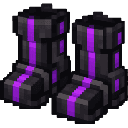
Chestplate
Uses a netherite chestplate, two netherite ingots, three black dyes, one purple dye, a turtle scute, and magma cream.


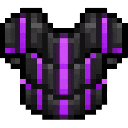
Leggings
Uses five netherite ingots, one black dye, one purple dye, and one amethyst shard.
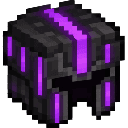
Boots
Uses three netherite ingots and one amethyst shard.
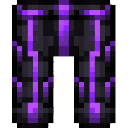
Abilities And Mechanics
With all four pieces equipped, the set grants:
- Water Breathing for underwater exploration.
- Fire Resistance.
- Night Vision.
- Poison removal: the set removes the Poison status effect while you wear it.
The special abilities are tied to wearing the full set, not to any one piece.
Progression And Strategy
Gather the netherite ingredients and other materials listed in the recipes, then craft the full set before exploring underwater or entering fire-prone areas. Remember to equip every piece: missing even one means you won’t have the set’s abilities.
How to install
This Java mod can be used on Windows and Mac PCs with the CreativeMode Launcher or any Minecraft launcher of your choice.

1. Download and install the new CreativeMode Launcher

2. Click to play on the top of the screen.
3. That's it — launches instantly. No complicated setup required.
Want to use on a different launcher? Download mod and manually install.
Players also liked
Iron Man Mod


Repulsor Flight Armor adds a full Iron Man–style armor set: the charged chestplate grants creative‑style flight (press Space to take off), R fires a powerful repulsor beam and X launches explosive rockets, leggings give Speed V and Jump Boost II while sprinting (charged), boots n…
This mod is licensed under the CreativeMode Mods License.