

Description
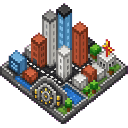
Vaultside Mega City: a placeable multiblock that instantly generates a massive, fully connected modern city for exploration and role-play. Generates downtown skyscrapers, suburban neighborhoods, beaches and boardwalks, large themed amusement parks, shopping districts, malls, restaurants, hotels, schools, hospitals, police and fire stations, parks, sports stadiums, campgrounds, forests, lakes, rivers, farms, airport, train station, harbor, highways, bridges, parking lots, apartments, office buildings, museums, libraries, banks, zoos, aquariums, movie theaters, and a massive water park. Includes detailed streets, sidewalks, traffic lights, trees, landscaping and decorations, and an above-ground, Fallout-inspired vault entrance as a landmark and city gateway. Fully explorable, connected terrain designed for building, role-playing, and realistic urban exploration.
Mod Wiki
Vaultside Mega City
Quickstart
- Craft the Vaultside Mega City placer item at a crafting table:


- Find a large, flat area — the city generates across a massive footprint, so choose open terrain well away from any builds you want to keep.
- Face the direction you want the city to extend toward, then place the item on the ground like any block. The direction you are facing determines the city's orientation (north, south, east, or west).
- The placer block disappears instantly and the entire city generates around that spot. Start exploring immediately!
Overview
Vaultside Mega City is a single-item mod that stamps a complete, fully connected modern metropolis into your world the moment you place one block. Every district, road, landmark, and natural feature generates at once — no waiting, no chunk-by-chunk building. The result is a ready-made city built for exploration, role-play, and creative building projects.
What It Adds
One craftable item: the Vaultside Mega City placer, which triggers the entire city generation on placement.
The city itself includes:
| Zone | Highlights |
|---|---|
| Downtown | Skyscrapers, office buildings, apartments, banks, museums, libraries |
| Shopping | Malls, shopping districts, restaurants, movie theaters |
| Civic | Schools, hospitals, police stations, fire stations |
| Recreation | Sports stadiums, parks, amusement parks, water park, zoo, aquarium |
| Lodging | Hotels, campgrounds |
| Transport | Airport, train station, harbor, highways, bridges, parking lots |
| Residential | Suburban neighborhoods, farms, forests |
| Natural | Beaches, boardwalks, lakes, rivers |
| Landmark | A Fallout-inspired above-ground vault entrance serving as the city gateway |
Every area is connected by detailed streets and sidewalks complete with traffic lights, trees, and landscaping.
How To Use
Placing the City
- Hold the Vaultside Mega City item and place it on any solid surface.
- Orientation matters: the city fans out in the direction you are facing when you place the block. Choose your facing direction intentionally so the layout fits your world.
- The placer block vanishes immediately after placement; the city chunks appear in its place.
Exploring
- All districts are connected by roads and walkways — you can walk from the harbor to the suburbs without leaving the city.
- The vault entrance landmark near the city gateway makes a useful central reference point for navigation.
- The city is fully explorable on foot; enter buildings, walk the boardwalk, visit the amusement park, or climb the skyscrapers.
Building and Role-Play
- Because all structures are placed as normal Minecraft blocks, you can modify, decorate, redecorate, or demolish any part of the city.
- The connected road network and pre-built interiors make the city an ideal foundation for role-play servers, adventure maps, or creative projects.
Crafting And Obtaining
The Vaultside Mega City placer is crafted at a crafting table using diamonds, emeralds, and a nether star:
All three ingredients must be in your inventory to unlock the recipe in the crafting table.
Abilities And Mechanics
- Direction-aware generation: The city rotates to match the cardinal direction you faced when placing the block (north, south, east, or west), so you always control which way the layout opens up.
- Instant multiblock: The entire city is assembled from many large structure segments that are all placed simultaneously the moment the placer block is set down. There is no progress bar or delay — the city appears at once.
- Destructible terrain: All city blocks can be mined and broken normally, making it easy to renovate or repurpose any part of the city after it generates.
Progression And Strategy
- Pick your spot carefully. The city covers an enormous area. Scout from above (use a high vantage point or spectator mode) before placing to avoid overwriting terrain you care about.
- Face intentionally. Decide which real-world direction (north/south/east/west) you want the city's "front" — the vault entrance gateway — to face before you place the block.
- Use it as a hub. Because the city includes farms, forests, lakes, and natural terrain alongside urban districts, it can serve as the central hub of a larger survival or role-play world.
- Gather resources first. Crafting requires diamonds, emeralds, and a nether star, so the city is a mid-to-late-game reward — something to place once you have established yourself in a world.
How to install
Download the mod and follow the step-by-step installation guide.
This mod is licensed under the CreativeMode Mods License.