


Description
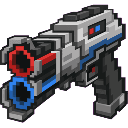
Handheld launcher that fires paired red and blue 2x2 portals. Entering one portal teleports you to the other. Portals persist until replaced.
Mod Wiki
Twin Portal Launcher
Quickstart
- Craft the Twin Portal Launcher at a crafting table (recipe below).
- Hold it in your hand and use (right-click / tap) to fire your first portal — it lands as a red 2×2 portal on whatever surface you're aiming at (up to 50 blocks away).
- Use again to fire the paired blue portal somewhere else.
- Walk into either portal to instantly teleport to the other one.
Overview
The Twin Portal Launcher is a single handheld item that lets you place a linked pair of teleportation portals anywhere in the world. Each player maintains their own independent red–blue pair. Step through one portal and you emerge from the other — no building required, no frame to construct.
What It Adds
- Twin Portal Launcher — an epic-rarity, enchantable handheld device that shoots paired portals onto surfaces.
How To Use
Firing Portals
Hold the launcher and use it (right-click on Java-style controls, or tap the use button on Bedrock touch). Each use alternates between placing the red portal and the blue portal:
- 1st use → Red portal placed on the targeted surface.
- 2nd use → Blue portal placed on the targeted surface.
- Subsequent uses continue to alternate.
The launcher has a short recharge between shots. If you fire too quickly, you'll see a "Launcher recharging…" message.
Portals can be placed on floors, walls, and ceilings. The launcher performs a raycast up to 50 blocks in the direction you're looking. If no solid surface is in range, or the surface isn't suitable, you'll receive an error message and no portal is placed.
Teleporting
Once both a red and a blue portal exist, simply walk into either one to be teleported to the other. You'll hear an enderman portal sound and see a particle burst at the destination. A 2-second cooldown prevents you from bouncing back and forth immediately.
Replacing Portals
Firing a new red portal automatically removes your previous red portal (and vice versa for blue). Portals persist in the world until you replace them — they do not disappear on their own.
Crafting And Obtaining
The launcher is crafted at a crafting table. The recipe unlocks automatically once you have an Ender Pearl, Blaze Rod, or Nether Star in your inventory.
The item appears in the Equipment tab of the creative inventory and can also be obtained via the /give command.
Abilities And Mechanics
| Property | Details |
|---|---|
| Portal size | 2×2 blocks (red or blue stained glass) |
| Max range | 50 blocks (line-of-sight raycast) |
| Portals per player | One red + one blue |
| Shot cooldown | ~0.5 seconds |
| Teleport cooldown | 2 seconds (prevents loop-teleporting) |
| Durability | 500 uses (10–25% damage chance per shot) |
| Rarity | Epic (enchanted glint always visible) |
Durability & Repair
The launcher has 500 durability. It can be repaired in an anvil:
- Iron Ingot — restores 100 durability.
- Ender Pearl — restores 250 durability.
Enchanting
The launcher uses the sword enchantment slot with an enchantability of 12, so it can be enchanted at an enchanting table or anvil with sword-compatible enchantments such as Unbreaking and Mending.
Progression And Strategy
- Early mobility: Craft the launcher as soon as you reach the Nether (you need a Blaze Rod and Nether Star). A Nether Star requires defeating the Wither, making this a mid-to-late game item.
- Dimension hopping: Both portals track which dimension they were placed in, so you can place one portal in the Overworld and one in the Nether (or End) for rapid cross-dimension travel.
- Persistent anchors: Because portals stay until replaced, you can set up semi-permanent fast-travel points between a base and a distant location, swapping only one end when you need to move.
- Combat mobility: The launcher slightly slows movement while charging (use animation), so fire portals before a fight rather than mid-combat.
- Keep it repaired: Bring Ender Pearls — they restore half the launcher's total durability in one anvil operation and are easier to farm than crafting a new launcher.
How to install
Download the mod and follow the step-by-step installation guide.
This mod is licensed under the CreativeMode Mods License.