

Description
Make mythical/fantasy/gothy extra large empty barn and extra large empty garden using the colors turquoise, black, magenta and purple themed with fencing and gate
Mod Wiki
Twilight Thorn Farmstead
Quickstart
- Craft a Twilight Barn Blueprint or Twilight Garden Blueprint at a crafting table.
- Find a large, open area: each blueprint places a very large structure around your position, so leave plenty of room and keep nearby builds clear.
- Hold the blueprint and use it to place the matching structure.
- Explore the empty, gothic-themed barn or fenced garden, then furnish or use the space as you like.
Overview
Twilight Thorn Farmstead provides two oversized, empty structures in a turquoise, black, magenta, and purple fantasy-gothic style. The barn and garden are ready-made spaces for your own farmstead ideas; they do not come stocked with animals, crops, or furnishings.
What It Adds
| Blueprint | Structure |
|---|---|
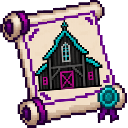
| Twilight Barn Blueprint | An extra-large empty barn |
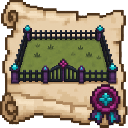
| Twilight Garden Blueprint | An extra-large empty garden with fencing and a gate |
How To Use
Use each blueprint to place its corresponding structure around your current position. Choose a spacious site before using it, since the builds cover a large area and can replace blocks where they are placed.
Crafting And Obtaining
Craft the blueprints at a crafting table:
Twilight Barn Blueprint


Twilight Garden Blueprint


Progression And Strategy
There is no required progression. Start with whichever structure suits your plans, and leave room for the full build before placing it. The empty interiors and garden give you space to add your own animals, crops, paths, and decorations.
How to install
Download the mod and follow the step-by-step installation guide.
This mod is licensed under the CreativeMode Mods License.