

Description
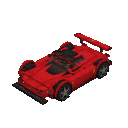
Craft the racer and bring a new ride into your Minecraft world!
Mod Wiki
Turbo Shades Racer
Quickstart
Craft the racer, then place it on clear ground. Its full display assembles around the placed block. Right-click any part of the display to summon the ride and mount it.


While riding, use W/A/S/D to move: W drives forward, S reverses, and A/D move sideways. Press your sprint key to dismount; crouching does not dismount you.
Overview
Turbo Shades Racer is a placeable racer that becomes a rideable vehicle. Activating its display replaces the display with the vehicle, and you climb aboard automatically.
How To Use
- Mount: Right-click the parked vehicle. Crouching prevents this interaction.
- Drive: Use the movement keys. Forward is faster than reversing or moving sideways.
- Dismount: Press your sprint key. The racer stays parked and can be mounted again.
- Check the HUD: While riding, the screen shows speed, heading, and altitude. The camera switches to rear third-person while you ride and returns to your previous view after dismounting.
Crafting And Obtaining
The recipe uses iron ingots, redstone, red stained glass panes, and a saddle. It crafts one racer.
Abilities And Mechanics
The racer has gravity, so it falls when airborne. If the vehicle is destroyed, it drops a racer item.
How to install
This Java mod can be used on Windows and Mac PCs with the CreativeMode Launcher or any Minecraft launcher of your choice.

1. Download and install the new CreativeMode Launcher

2. Click to play on the top of the screen.
3. That's it — launches instantly. No complicated setup required.
Want to use on a different launcher? Download mod and manually install.
This mod is licensed under the CreativeMode Mods License.