


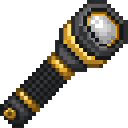
Description
The Torchbeam Flashlight is a handheld light that projects a straight, focused beam one block in front of your eyes out to 20 blocks with consistent brightness, stopping at the first non-air/non-light block; hold it in either hand and right-click to toggle it on and off — flashlights start toggled off by default if they have no saved state, the on/off state is saved to the item and shown in the tooltip, toggling gives brief action-bar feedback, and the beam disappears the moment you put the flashlight away. The flashlight’s crafting recipe no longer unlocks automatically: it is granted only after you craft sticks for the first time, and the previous join/load recipe-grant behavior has been removed.
Mod Wiki
Torchbeam Flashlight
Quickstart
- Unlock the recipe by crafting any sticks — the flashlight recipe is automatically added to your recipe book the first time you do.
- Craft the flashlight using the recipe below and keep it in your main hand or off-hand.
- Right-click to toggle it on. You'll see a green "Flashlight on" message above your hotbar.
- Point your view down a dark corridor and watch the beam light up the path ahead of you.
Overview
The Torchbeam Flashlight is a single handheld item that casts a focused beam of light straight out from your eyes. Unlike placing torches, it illuminates only the narrow strip of blocks directly in front of you — up to 20 blocks deep — and the light vanishes the instant you put it away or toggle it off.
What It Adds
- Torchbeam Flashlight — a stacksize-1 tool found in the Tools creative tab. It projects a straight beam of consistent brightness along your line of sight, starting one block in front of your eyes and extending up to 20 blocks until the beam hits a solid block.
How To Use
| Action | Result |
|---|---|
| Hold in main hand or off-hand | Flashlight is ready to toggle |
| Right-click (air or block) | Toggles the beam on or off |
| Put item away / switch slots | Beam immediately disappears |
- The on/off state is saved to the item, so a flashlight you toggle on stays on even after logging out and back in.
- Your tooltip always shows the current state: Light: ON or Light: OFF.
- Each toggle shows a brief action-bar message confirming the new state.
Abilities And Mechanics
Beam behaviour
- The beam traces a single straight line in the exact direction you are looking.
- It starts 1 block from your eyes and travels up to 20 blocks.
- Every block along the beam is lit at a consistent level 10 brightness — there is no fade-off as distance increases.
- The beam stops at the first solid (non-air) block it encounters; it does not pass through walls or other opaque blocks.
- Light blocks placed by the flashlight are cleaned up immediately when you stop holding it or turn it off — no leftover light sources remain in the world.
State persistence
- On/off state is stored in the item's data, so it survives inventory management, world reloads, and multiplayer sessions.
- A brand-new flashlight with no saved state defaults to off.
Crafting And Obtaining
The recipe is locked until you craft sticks for the first time. Once you do, it appears in your recipe book automatically.
Ingredients: Iron Ingots × 6, Stick × 1, Torch × 1, Glass × 1
Progression And Strategy
- Early game: Craft sticks (which you'll do naturally when making your first tools) to immediately unlock the flashlight recipe. A torch and a few iron ingots are all you need to light up mines without placing torches everywhere.
- Exploration: The 20-block focused beam is ideal for scouting tunnels, checking for mobs ahead, and navigating ocean monuments or strongholds without leaving a trail of torches.
- Off-hand use: Keep a weapon or tool in your main hand and the flashlight in your off-hand so you can fight and illuminate at the same time.
- Toggle discipline: Remember the flashlight defaults to off — right-click before heading into the dark. Because the light disappears the moment you swap items, consider dedicating a hotbar slot to it for quick access.
How to install
This Java mod can be used on Windows and Mac PCs with the CreativeMode Launcher or any Minecraft launcher of your choice.

1. Download and install the new CreativeMode Launcher
2. Click to play on the top of the screen.
3. That's it — launches instantly. No complicated setup required.
Want to use on a different launcher? Download mod and manually install.
This mod is licensed under the CreativeMode Mods License.