


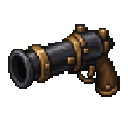
Description
Craft and wield a siege cannon to launch explosive TNT shells at your targets.
Mod Wiki
Tnt Siege Cannon
Quickstart
- Craft a Siege Cannon using six iron ingots and a flint and steel:
- Keep TNT in your inventory and hold the cannon.
- Aim at a target and use the cannon (right-click by default). It launches a primed TNT shell in the direction you’re looking. Try it in an open area—the shell explodes after about three seconds.
Overview
The Siege Cannon is a single-use-at-a-time weapon for firing explosive TNT shells. Each shot consumes one TNT from your inventory; players in Creative mode can fire without using ammunition.
How To Use
Hold the cannon and use it to fire. The shell travels forward from where you’re aiming, so adjust your aim before firing. The cannon has a brief cooldown between shots.
Crafting And Obtaining
Craft the Siege Cannon with the recipe above. It can also be obtained from the Creative inventory.
Abilities And Mechanics
- Each shot launches a primed TNT shell with a fuse of about three seconds.
- Firing consumes one TNT from your inventory, unless you’re in Creative mode.
- If you have no TNT, the cannon displays an ammunition warning.
- The cannon cannot fire again until its roughly two-second cooldown ends.
Progression And Strategy
Keep extra TNT on hand for repeated shots, and allow time for the shell’s fuse when judging your aim. Give yourself room to fire and watch the explosion.
How to install
This Java mod can be used on Windows and Mac PCs with the CreativeMode Launcher or any Minecraft launcher of your choice.

1. Download and install the new CreativeMode Launcher

2. Click to play on the top of the screen.
3. That's it — launches instantly. No complicated setup required.
Want to use on a different launcher? Download mod and manually install.
This mod is licensed under the CreativeMode Mods License.