


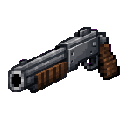
Description
The Thunder Barrel is a powerful 12 gauge shotgun capable of dealing 30 damage per shot against enemies within 12 blocks. Right-click to fire, and watch as smoke trails mark the path of each shot while struck enemies are knocked back. The shotgun holds 3 shots before requiring a 2-second reload, indicated by a "Reloading..." message on screen, and has a short half-second cooldown between each individual shot to keep things balanced.
Mod Wiki
Thunder Barrel
Quickstart
- Open your inventory — the Thunder Barrel is found in the Combat creative tab, or craft one with the recipe below.
- Hold the Thunder Barrel in your hand and right-click to fire.
- Move close to enemies (within 12 blocks) for maximum damage, then blast away.
Overview
The Thunder Barrel is a hard-hitting 12-gauge shotgun that brings explosive close-range firepower to Minecraft combat. It fires with a distinctive boom, sends visible smoke trails through the air, and knocks back anything it hits — making it equally effective for crowd control and burst damage.
What It Adds
| Item | Description |
|---|---|
| Thunder Barrel | A single-stack ranged weapon found in the Combat item group |
How To Use
- Right-click to fire a shot. Each shot deals 30 damage to enemies within 12 blocks.
- Struck enemies are knocked back, and smoke particle trails mark the path of each projectile.
- A custom gunshot sound plays on every fire.
Abilities And Mechanics
Ammo & Reload
The Thunder Barrel holds 3 shots before it needs to reload. After the third shot, a "Reloading…" message appears on screen. The reload takes 2 seconds, after which the gun is ready to fire again.
Shot Cooldown
Even within a single clip, there is a 0.5-second cooldown between each individual shot. This prevents rapid-fire spam while still allowing you to deliver three quick, powerful blasts in succession.
Damage & Range
| Stat | Value |
|---|---|
| Damage per shot | 30 |
| Effective range | 12 blocks |
| Shots before reload | 3 |
| Cooldown between shots | 0.5 seconds |
| Reload time | 2 seconds |
Progression And Strategy
- Close-quarters ambush: Duck into melee range and dump all three shots into a tough mob for up to 90 damage before it can react.
- Knockback control: Use the knockback effect to push enemies off ledges or keep them at bay while you reload.
- Time your reloads: After every third shot, retreat or take cover during the 2-second reload window — getting caught mid-reload is dangerous.
- Crafting priority: The recipe uses common materials (iron ingots, sticks, a barrel, and TNT), so you can craft the Thunder Barrel relatively early in a survival playthrough.
How to install
This Java mod can be used on Windows and Mac PCs with the CreativeMode Launcher or any Minecraft launcher of your choice.

1. Download and install the new CreativeMode Launcher

2. Click to play on the top of the screen.

3. That's it — launches instantly. No complicated setup required.
Want to use on a different launcher? Download mod and manually install.
This mod is licensed under the CreativeMode Mods License.