


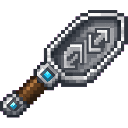
Description
Hold The Scooper Duper in your main hand and place any item in your off-hand, then right-click to duplicate that item and add it directly to your inventory. If your inventory is full, the duplicated copy will drop on the ground at your feet. There is a short 1-second cooldown between uses.
Mod Wiki
The Scooper Duper
Quickstart
- Craft The Scooper Duper using the recipe below and grab it from your inventory (or find it in the Tools & Utilities creative tab).
- Hold The Scooper Duper in your main hand.
- Place any item you want to duplicate in your off-hand.
- Right-click — a copy of the off-hand item is instantly added to your inventory.
- Wait out the 1-second cooldown, then repeat!
Overview
The Scooper Duper is a single-use-per-second tool that lets you duplicate any item held in your off-hand. It's a powerful creative utility that turns one copy of an item into a growing stack over time, limited only by the cooldown between uses.
What It Adds
| Item | Stack Size | Found In |
|---|---|---|
| The Scooper Duper | 1 | Tools & Utilities tab, crafting |
How To Use
- Main hand: Hold The Scooper Duper.
- Off-hand: Hold the item you wish to duplicate (any item works).
- Right-click to duplicate. One copy of the off-hand item is created and placed directly into your inventory.
- If your inventory is full, the duplicated item drops at your feet — make sure to pick it up.
- A 1-second (20-tick) cooldown activates after each use. The item will briefly show a cooldown overlay on your hotbar.
- A sound effect plays on each successful duplication so you know it worked.
Abilities And Mechanics
- Duplicates exactly one item per use — the count of the duplicated stack is always 1.
- The item in your off-hand is never consumed; only a copy is created.
- Works with virtually any item, including tools, blocks, and rare drops.
- The cooldown prevents instant spam-duplication; you can duplicate at a rate of once per second.
Progression And Strategy
- Craft The Scooper Duper early to turn a single rare drop (like a Netherite Ingot or Elytra) into as many copies as you need — just keep right-clicking with it in hand.
- Keep a clear inventory slot open before using it to avoid drops, especially when bulk-duplicating.
- Because only one copy is produced per click, pair it with some patience (or a macro) to build up large quantities quickly.
How to install
This Java mod can be used on Windows and Mac PCs with the CreativeMode Launcher or any Minecraft launcher of your choice.

1. Download and install the new CreativeMode Launcher

2. Click to play on the top of the screen.

3. That's it — launches instantly. No complicated setup required.
Want to use on a different launcher? Download mod and manually install.
This mod is licensed under the CreativeMode Mods License.