Description
/fleshinfection status to see how far the spread has reached, and /fleshinfection cleanse to wipe it out if things get out of hand.


The Flesh That Hates introduces a living, breathing infection system to Minecraft. A virulent blight — the Flesh Infection — can seize control of terrain and creatures alike. Infected Flesh Blocks silently creep across the landscape, converting dirt and soil while exposing any living thing nearby to the disease. Every mob in the game can contract the infection, and once marked, they stay infected permanently — continuing to spread the blight and take damage even after the visible status effect fades.
Outbreaks can be sparked deliberately with crafted tools, stumbled upon by encountering infected hostile mobs, or seeded by placing Infected Flesh Blocks directly into the world. The mod also gives you the tools to contain or erase what you've unleashed.
| Block | Description |
|---|---|
| Infected Flesh Block | A spreading, pulsating block that corrupts nearby terrain and infects creatures that stand too close. Emits crimson spore particles. |
| Item | Description |
|---|---|
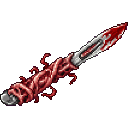
| Infection Scalpel | A melee tool and direct-use item. Hit mobs or right-click blocks to infect them on contact. Has durability. |
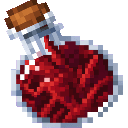
| Flesh Vial | A crafting ingredient distilled from corruption. Also drops from Infected Spiders. |
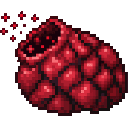
| Flesh Spore Sac | A throwable/usable item that detonates in a massive area-of-effect burst, infecting nearby mobs and converting many surrounding blocks at once. Consumed on use with a short cooldown. |
| Mob | Description |
|---|---|
| Infected Zombie | A tougher zombie (28 HP, 5 attack damage) that infects on hit and periodically emits an infection aura, spreading the blight to nearby mobs and corrupting the ground underfoot. Drops rotten flesh and occasionally a Flesh Spore Sac. |
| Infected Spider | A faster, stronger spider (20 HP, 4 attack damage) that infects on hit and radiates spores in a short-range aura. Drops string and occasionally a Flesh Vial. |
| Command | Effect |
|---|---|
/fleshinfection status | Reports the number of infected blocks and creatures in the surrounding area. |
/fleshinfection cleanse | Converts all nearby Infected Flesh Blocks back to dirt and removes the infection from nearby entities. |
Craft items in this order — each tier feeds into the next.
Flesh Vial — the foundation of all infection crafting:


Flesh Spore Sac — area-of-effect infection device:

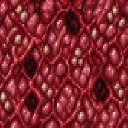
Infected Flesh Block — placeable spreading block:


Infection Scalpel — direct infection tool:
Flesh Vials and Flesh Spore Sacs can also be obtained by killing Infected Spiders and Infected Zombies respectively, though drops are not guaranteed.
The infection propagates through several overlapping systems:
Unlike a normal status effect, the infection leaves a hidden permanent marker on every mob it touches. This means:
Both infected mob variants periodically release a passive infection aura:
Early outbreak: Craft a Flesh Vial first, then upgrade to a Flesh Spore Sac for large-scale terrain conversion. A single Spore Sac can seed an outbreak across a significant area instantly.
Farming infection materials: Hunt Infected Zombies for Flesh Spore Sacs and Infected Spiders for Flesh Vials. These drop rates are uncommon, so killing in volume pays off.
Containment: If an outbreak grows unmanageable, /fleshinfection status will tell you the scope and /fleshinfection cleanse will purge it. Act fast — Infected Flesh Blocks spread autonomously on random ticks and infected mobs wander freely.
Harvesting Infected Flesh Blocks: Mine them normally to collect them as placeable items. They can be replanted anywhere dirt-like blocks exist to seed new outbreaks at will.
Survival threat: Infected Zombies and Spiders are meaningfully stronger than their vanilla counterparts. Avoid fighting them in close quarters without armor — their on-hit infection combined with their aura makes even a brief engagement dangerous for you and any nearby mobs.
This Java mod can be used on Windows and Mac PCs with the CreativeMode Launcher or any Minecraft launcher of your choice.

1. Download and install the new CreativeMode Launcher

2. Click to play on the top of the screen.
3. That's it — launches instantly. No complicated setup required.
Want to use on a different launcher? Download mod and manually install.
This mod is licensed under the CreativeMode Mods License.


