Description
Craft it with:


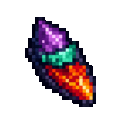
The Dimension Shard is a single powerful item that tears open a temporary rift into another dimension around the player who uses it. For sixty seconds, the sky shifts color, strange sounds echo, particles swirl, and unusual events occur nearby. It's a short, intense burst of otherworldly spectacle rather than a permanent change to your world — once the timer runs out (or you leave the world/dimension), everything returns to normal instantly.
Simply hold the Dimension Shard and use it (right-click). This immediately:
While the rift is active, you'll notice:
You cannot activate a second rift while one is already open — using the shard again will simply tell you the rift is already active.
Important: The rift is tied to the world and location where you activated it. If you leave that world (for example, by traveling to a different dimension) or the effect naturally times out, the rift closes instantly and all effects fade immediately, restoring the normal sky and ambiance.
Craft a Dimension Shard from Ender Eyes, Wheat Seeds, and Blaze Powder arranged in a full 3x3 grid:
You may also stumble upon a Dimension Shard as rare loot while exploring the Nether — check chests in bastions, ruined portals, and nether fortresses.
Dimension Shards can be stacked up to 16 per stack, so you can carry a small supply for repeated use.
The Dimension Shard is best used as a short-term utility or spectacle item — activate it when you want a temporary boost (Speed, Resistance, Night Vision) combined with atmospheric flair, such as before exploring dangerous areas or just for the experience. Since it can also be found in Nether loot, exploring bastions and ruined portals gives you a chance to stock up on extra shards without crafting more. Because the effect is strictly time-limited and cancels the moment you change dimensions, plan your usage for moments where you'll stay put — the full sixty seconds of otherworldly ambiance is best enjoyed without immediately portaling away.
This Java mod can be used on Windows and Mac PCs with the CreativeMode Launcher or any Minecraft launcher of your choice.

1. Download and install the new CreativeMode Launcher

2. Click to play on the top of the screen.
3. That's it — launches instantly. No complicated setup required.
Want to use on a different launcher? Download mod and manually install.
This mod is licensed under the CreativeMode Mods License.


