

Description
Each death adds a curse; cleanse them with gems before ten curses get you banned.
Mod Wiki
Tenfold Curse
Quickstart
- Craft a Curse Gem and right-click it to remove one random active curse. It is consumed only when it removes a curse.
- Each death gives you one new, non-repeating curse. Watch the ten gem markers above your food meter; reaching ten curses after a death bans you from the server.
- Press L by default to open your curse ledger and review your active curses. To choose one to remove, craft an Uncurse , right-click it, then click a curse in the list. The Uncurse is consumed when you choose a curse.
- In multiplayer, a player with a Revive Crystal can right-click it and select a banned player to lift their ban. The crystal does not cleanse that player’s curses.
Overview
Tenfold Curse turns deaths into a growing set of penalties. Curses remain active until removed, and each death can add another. Cleanse them before a death brings your total to ten.
What It Adds
| Item | Use |
|---|---|
| Curse Gem | Right-click to remove a random active curse. |
| Uncurse | Opens a list so you can choose which curse to remove. |
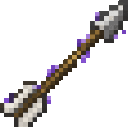
| Arrow of Cursing | A hit on a player inflicts one random curse. |
| Revive Crystal | Opens a list of banned players; select one to lift their ban. |
The curse ledger lists your active curses and their effects. Its default key is L; change it in the Controls settings. Use the arrow keys or Page Up/Page Down to navigate multiple pages. When choosing a curse to cleanse or a player to revive, click the entry.
Your HUD shows up to ten gem markers above the food meter, one for each active curse.
Crafting And Obtaining
Craft the items in a crafting table:
Curse Gem


Uncurse




Arrow of Cursing
Revive Crystal
Use Arrow of Cursing as arrow ammunition in a bow or crossbow. It curses players it hits.
Abilities And Mechanics
Curses are selected at random, with different curses having different chances. You cannot receive the same curse twice.
| Curse | Effect |
|---|---|
| Everlasting Hunger | Hunger depletes twice as fast. |
| Distant Sight | Limits vision to roughly 100 blocks. |
| Heavy Steps | Movement and sprint speed are 30% slower. |
| Feeble Might | Strength potions have no effect. |
| Grounded | Elytra flight is disabled. |
| Glass Soul | You take twice as much damage. |
| Limping | You cannot sprint. |
| Rooted | You cannot jump. |
| Prey | Mobs deal twice as much damage to you. |
| Vegetarian | You cannot eat meat. |
| Bound | You cannot throw ender pearls. |
| Discordant | You cannot eat chorus fruit. |
| Storm Marked | You may be struck by lightning at random. |
| Dull Tools | Mining Fatigue periodically slows you. |
| Unsteady Grip | You may randomly drop an item from your hand. |
| Shrouded | Blindness may strike for five seconds. |
Progression And Strategy
Keep cleansing supplies ready before taking on dangerous fights or exploring risky areas. Use a Curse Gem when you are happy to remove a random penalty; save an Uncurse for a particularly harmful one. A Revive Crystal lifts a selected player’s ban, but does not remove their curses, so they may still need to cleanse them.
How to install
This Java mod can be used on Windows and Mac PCs with the CreativeMode Launcher or any Minecraft launcher of your choice.

1. Download and install the new CreativeMode Launcher

2. Click to play on the top of the screen.
3. That's it — launches instantly. No complicated setup required.
Want to use on a different launcher? Download mod and manually install.
This mod is licensed under the CreativeMode Mods License.