

Description
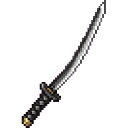
The Sweeper is a powerful ninja katana that strikes faster than a standard sword, making it ideal for taking down enemies in rapid succession. It hits hard and swings with impressive speed, giving it an edge in close-quarters combat. Craft it with netherite-tier materials and find it in the Combat creative tab.
Mod Wiki
Sweeper
Quickstart
- Open your crafting table and craft the Sweeper using the recipe below.
- Equip it in your main hand and start swinging — you'll notice it attacks noticeably faster than a standard sword.
- You can also find the Sweeper directly in the Combat creative tab if you want to try it right away.


Overview
The Sweeper is a ninja katana-style weapon built for rapid, aggressive melee combat. It swings faster than a normal sword while still hitting hard, making it excellent for cutting down enemies in quick succession.
What It Adds
| Item | Description |
|---|---|
| Sweeper | A fast-swinging katana sword with netherite-tier stats |
Abilities And Mechanics
- Attack Damage: High base damage, on par with netherite-tier weapons.
- Attack Speed: Significantly faster swing speed than a standard sword (attack speed of −2.2, compared to a sword's −2.4), letting you land more hits per second.
- Sword Efficiency: Breaks cobwebs and other sword-efficient blocks quickly, just like any standard sword.
- Stacks to 1 (a proper weapon item — no stacking).
Crafting And Obtaining
Craft the Sweeper at a crafting table using iron ingots and a stick. It can also be found in the Combat creative tab.
Progression And Strategy
- The Sweeper's speed advantage shines in fast-paced fights where landing multiple hits quickly matters more than raw burst damage.
- Use it to combo enemies before they can retaliate — the rapid swing rate can stagger mobs faster than a standard sword.
- Pair it with high-tier armor to maximise survivability during aggressive close-quarters engagements.
How to install
This Java mod can be used on Windows and Mac PCs with the CreativeMode Launcher or any Minecraft launcher of your choice.

1. Download and install the new CreativeMode Launcher

2. Click to play on the top of the screen.

3. That's it — launches instantly. No complicated setup required.
Want to use on a different launcher? Download mod and manually install.
This mod is licensed under the CreativeMode Mods License.