

Description
add a Tesla rodester that flightes
Mod Wiki
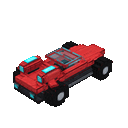
Stormwing Roadster
Quickstart
Craft a Roadster placer with iron, redstone, diamonds, and an ender pearl. Use it on a block to spawn the Roadster and automatically mount it. The placer is not consumed, so you can use it again.
While riding, steer with your usual movement controls and look in the direction you want to fly. Tap/use to trigger the Thruster Pulse shown on your screen; it boosts the Roadster along your view direction.
Overview
The Stormwing Roadster is a one-seat, steerable flying vehicle. It has no gravity, so it can fly without needing to take off from a runway.
What It Adds
- Stormwing Roadster: A single-passenger vehicle that can fly and be steered in the air.
- Roadster placer: A reusable item for spawning and mounting the vehicle.
- Thruster Pulse: A short directional burst for extra movement while riding.
How To Use
- Place the Roadster on a clear spot by using the placer on a block. It appears beside the block face you target, then mounts you automatically.
- Steer with your normal movement controls. Look up or down to aim your flight direction.
- Tap/use to trigger Thruster Pulse. Jumping or landing an attack while mounted can trigger it too.
- Dismount with your usual dismount control (typically sneak/crouch).
The pulse has a 1.5-second cooldown; its remaining time appears in the on-screen action prompt.
Crafting And Obtaining
Craft the Roadster placer at a crafting table:


You can also summon the vehicle with /summon com_stormwing_roadster_v7u6cg4g:stormwing_roadster; interact with it to mount.
Abilities And Mechanics
- Flight: The Roadster can fly and be steered in the air.
- Thruster Pulse: A brief impulse in the direction you are looking. It works while you are driving and has a 1.5-second cooldown.
- One seat: Only one player can ride at a time.
Progression And Strategy
There is no separate progression path. Try steering through open air first, then use the pulse to boost toward a destination or adjust your flight.
How to install
Download the mod and follow the step-by-step installation guide.
This mod is licensed under the CreativeMode Mods License.