


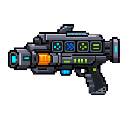
Description
The Stewie Component Tech Tree is a powerful multi-mode weapon with 14 distinct firing modes, all unlocked from the moment you obtain it. Right-click to fire your currently selected mode, and Sneak + Right-Click to cycle through all 14 modes, with the current mode name displayed on screen when switching. Modes range from rapid-fire Ray Gun blasts and close-range Spread Shots, to slow but devastating Plasma Artillery and Hyper Plasma Balls, explosive Rockets, instant Shock Waves that blast nearby enemies away, and Heat Seekers that fire three homing rockets tracking the nearest target within 20 blocks.
Mod Wiki
Stewie Component Tech Tree
Quickstart
- Craft the Stewie Component Tech Tree using the recipe below, or find it in the Combat creative tab.
- Hold it in your hand and Right-click to fire in your current mode (starts as Ray Gun).
- Sneak + Right-click to cycle to the next firing mode — the mode name flashes on your screen in gold text.
- Experiment with all 14 modes to find your favourite for any combat situation.
Overview
The Stewie Component Tech Tree is a single, all-in-one ranged weapon that packs 14 distinct firing modes into one item. Every mode is available from the moment you obtain it — there is no unlocking progression. Simply cycle through modes until you find the right tool for the fight.
What It Adds
One craftable item: the Stewie Component Tech Tree, found in the Combat tab.
How To Use
| Action | Result |
|---|---|
| Right-click | Fire the currently selected mode |
| Sneak + Right-click | Cycle to the next firing mode |
The active mode name is shown as a gold action bar message each time you switch. Projectiles discard themselves after 5 seconds if they haven't hit anything.
Abilities And Mechanics
All 14 Firing Modes
| Mode | Projectiles | Damage | Notes |
|---|---|---|---|
| Ray Gun | 1 | 4 | Fast, standard blast |
| Spread Shot Lvl 1 | 5 | 3 each | Wide fan of projectiles |
| Spread Shot Lvl 2 | 7 | 4 each | Wider fan, more coverage |
| Plasma Ball Lvl 1 | 1 | 8 | Explosive on impact |
| Plasma Ball Lvl 2 | 1 | 12 | Larger explosion |
| Hyper Plasma Ball Lvl 1 | 1 | 16 | Heavy explosion |
| Hyper Plasma Ball Lvl 2 | 1 | 20 | Massive explosion |
| Plasma Artillery Lvl 1 | 1 | 24 | Slow but devastating explosion |
| Plasma Artillery Lvl 2 | 1 | Higher | Even more destructive explosion |
| Rocket Launcher Lvl 1 | 1 | 18 | Explosive rocket |
| Rocket Launcher Lvl 2 | 1 | 25 | Bigger rocket explosion |
| Heat Seekers | 3 | 20 each | Homing rockets, tracks nearest target within 20 blocks |
| Shock Wave Lvl 1 | Instant AoE | — | Blasts nearby enemies within ~5 blocks away from you, no projectile |
| Shock Wave Lvl 2 | Instant AoE | — | Stronger blast, ~8 block radius, higher knockback |
Explosive modes create a TNT-strength explosion on impact — be careful not to stand too close to your own shots.
Shock Wave modes are instant and require no projectile: all living entities within the radius are knocked away and damaged immediately upon firing.
Heat Seekers fire three simultaneous homing rockets. Each rocket continuously steers toward the nearest living entity within 20 blocks, adjusting its trajectory every tick.
Progression And Strategy
- Ray Gun is best for quick, accurate single-target shots at range.
- Spread Shot modes excel at close quarters against groups of mobs.
- Plasma Ball / Hyper Plasma Ball modes deal escalating area damage — use higher levels against tough or clustered enemies, but keep your distance.
- Plasma Artillery trades speed for raw power; fire ahead of a moving target and let the explosion do the work.
- Rocket Launcher modes are reliable all-rounders with good damage and blast radius.
- Heat Seekers shine in chaotic multi-mob situations where aiming precisely is difficult — fire in the general direction and let the rockets home in.
- Shock Wave is a close-range panic button, great for crowd control or when mobs have swarmed you.
How to install
This Java mod can be used on Windows and Mac PCs with the CreativeMode Launcher or any Minecraft launcher of your choice.

1. Download and install the new CreativeMode Launcher

2. Click to play on the top of the screen.

3. That's it — launches instantly. No complicated setup required.
Want to use on a different launcher? Download mod and manually install.
This mod is licensed under the CreativeMode Mods License.