

Description
Unleash a luminous cleaving strike with the Starklight Cleaving Axe.
Mod Wiki
Starklight Cleaving Axe
Quickstart
- Craft the axe using diamonds, glowstone dust, and sticks:


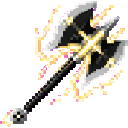
- Place the Starklight Cleaving Axe in your hotbar and equip it.
- Face a group of nearby enemies or other living entities.
- Press the Use Item button, usually right-click, to unleash a luminous cleaving strike.
- Keep targets in front of you and within roughly 4.5 blocks. The strike damages every valid living entity in its wide forward area, excluding you.
The special strike has a 1.5-second cooldown. You can also find the axe in the Combat section of the Creative inventory.
Overview
The Starklight Cleaving Axe is a diamond-tier axe with a powerful area attack. Its regular axe attacks can be used in close combat, while its activated cleaving strike damages multiple nearby living entities at once.
What It Adds
- Starklight Cleaving Axe
- Diamond-tier axe
- Deals 10 attack damage with regular attacks
- Has an attack speed of -3.1
- Mines blocks that can be mined with an axe
- Cannot be stacked
- Fires a luminous End Rod particle effect when its special strike is used
How To Use
Regular Attacks
Equip the axe and attack normally to use it as a melee weapon. It can also function as an axe for blocks that require axe mining.
Starklight Cleaving Strike
Use the axe with the Use Item control:
- The strike searches for living entities near you.
- Targets must be within about 4.5 blocks of your view position.
- Targets must be generally in front of you; the attack covers a broad forward arc.
- Every qualifying target is hit, so groups can be damaged together.
- The strike deals 8 damage, equal to 4 hearts.
- You are not damaged by your own strike.
- A sweeping attack sound and End Rod particles mark the activation.
- The axe enters a 30-tick cooldown after use.
Aim toward the center of a group for the best chance of catching multiple targets.
Crafting And Obtaining
Craft the Starklight Cleaving Axe with diamonds, glowstone dust, and sticks:
In Creative mode, obtain it from the Combat tab.
Abilities And Mechanics
| Property | Details |
|---|---|
| Weapon type | Axe |
| Regular attack damage | 10 |
| Attack speed | -3.1 |
| Special strike damage | 8 per target |
| Special strike range | Approximately 4.5 blocks |
| Special strike target area | Broad area in front of the player |
| Cooldown | 30 ticks, or 1.5 seconds |
| Stack size | 1 |
| Axe mining | Works on axe-mineable blocks |
The special strike affects living entities that are alive and close enough to the player. It does not require selecting a single target, allowing one activation to hit several enemies.
Progression And Strategy
Craft the axe once you have the required diamonds, glowstone dust, and sticks. It is especially useful when surrounded by several enemies:
- Let hostile mobs gather within range before activating the strike.
- Turn toward the densest part of a group.
- Use regular attacks between special strikes while the cooldown is active.
- Keep moving to avoid attacks while waiting for the cleaving strike to become available.
- Use the axe normally for both combat and axe-mineable blocks.
How to install
This Java mod can be used on Windows and Mac PCs with the CreativeMode Launcher or any Minecraft launcher of your choice.

1. Download and install the new CreativeMode Launcher

2. Click to play on the top of the screen.
3. That's it — launches instantly. No complicated setup required.
Want to use on a different launcher? Download mod and manually install.
This mod is licensed under the CreativeMode Mods License.