

Description
The Rideable Plane mod adds a multiblock aircraft you can place and pilot: right-click the placed structure to board, use the mouse to steer the nose, W to throttle up, S to slow down, press Space to fire the plane’s offensive payload, and Ctrl to exit at any time. This updated bomber accelerates to a HUD speed of 500 with faster throttle response, and its Space attack now unleashes an immediate, huge energy-wave blast with no cooldown that clears blocks in a large radius, deals massive damage and knockback to nearby entities, and shows dramatic particle effects—use with extreme caution.
Mod Wiki
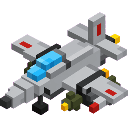
Skystrike Bomber
Quickstart
- Craft the Skystrike Bomber item using the recipe below.
- Place it in the world — the full multiblock aircraft structure assembles automatically around the placement point.
- Right-click the structure to board and take the pilot seat.
- Press W to throttle up, steer with your mouse, and take off.
- Press Space to unleash the energy-wave attack. Press Ctrl to exit.


Overview
Skystrike Bomber adds a rideable multiblock aircraft to the game. Craft a single item, place it, and an entire bomber spawns in the world ready to pilot. The plane flies freely in three dimensions, responds to mouse-look for steering, and carries a devastating energy-wave weapon capable of obliterating terrain and entities across a wide radius.
What It Adds
| Content | Description |
|---|---|
| Skystrike Bomber (item/block) | Craftable item that places the full multiblock aircraft structure |
| Bomber Vehicle | Rideable aircraft entity with flight controls and an offensive weapon |
| Pilot HUD | On-screen display showing speed, heading, and altitude while flying |
How To Use
Boarding
Right-click any part of the placed Skystrike Bomber structure to mount it. The camera automatically switches to third-person view while you are piloting.
Flight Controls
| Key | Action |
|---|---|
| Mouse | Steer — moves the nose up, down, left, right |
| W | Throttle up (increase speed) |
| S | Slow down (decrease speed) |
| Space | Fire energy-wave attack |
| Ctrl | Exit / dismount the bomber |
Note: Shift does not dismount the bomber. You must use Ctrl to exit safely.
Pilot HUD
While riding, a HUD bar appears across the top of the screen showing:
- SPD — current speed (maxes out around 500 at full throttle)
- HDG — heading in degrees
- ALT — current altitude (Y coordinate)
- A controls reminder:
W/S: Throttle | SPACE: Bomb | Ctrl: Exit
Crafting And Obtaining
Craft the Skystrike Bomber at a crafting table:
The recipe uses Feathers, a Piston, Iron Ingots, an Elytra, Gunpowder, and TNT. The item stacks to 1.
Abilities And Mechanics
Flight
The bomber has no gravity — it stays airborne as long as it is mounted and a rider is present. Speed is controlled incrementally with W and S. The bomber can reach a HUD speed of 500 at full throttle, with a responsive throttle system that accelerates quickly.
Energy-Wave Attack (Space)
Pressing Space triggers an immediate, large energy-wave blast centered on the bomber:
- Clears blocks in a large radius around the impact point
- Deals massive damage (500 points) to all nearby entities
- Applies significant knockback to survivors
- Produces dramatic particle effects and a custom explosion sound
- Has no cooldown — can be fired repeatedly
⚠️ Extreme caution advised. The blast radius is enormous and will destroy terrain and structures indiscriminately. Do not fire near builds you want to keep.
Structure Behavior
- Placing the Skystrike Bomber item automatically places the entire multiblock structure in the correct orientation, facing the direction you placed it.
- Breaking any single part of the structure removes the entire structure at once. No drops are lost — the main item is dropped.
- If the vehicle entity is damaged, it ejects its passenger and drops the Skystrike Bomber item.
Rider Visibility
While piloting, your player model is hidden from other players, keeping the visual clean and bomber-focused.
Progression And Strategy
- The Skystrike Bomber requires an Elytra to craft, placing it firmly in late-game progression after defeating the Ender Dragon.
- Use the bomber for aerial exploration at high speed — ALT and HDG readouts help with navigation.
- The energy-wave attack is best used against large groups of hostile mobs, open terrain targets, or during PvP — never near your own base.
- Because there is no cooldown on the weapon, you can chain multiple blasts rapidly. Be aware of the large block-destruction radius before firing in built-up areas.
- To land, simply slow with S, descend by pitching the nose down, and dismount with Ctrl when close to the ground.
How to install
This Java mod can be used on Windows and Mac PCs with the CreativeMode Launcher or any Minecraft launcher of your choice.

1. Download and install the new CreativeMode Launcher

2. Click to play on the top of the screen.

3. That's it — launches instantly. No complicated setup required.
Want to use on a different launcher? Download mod and manually install.
This mod is licensed under the CreativeMode Mods License.