

Description
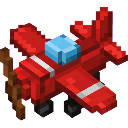
Place the multiblock plane structure, then right-click it to board and take flight. Once mounted, aim your mouse to steer the plane in any direction, including upward to climb and downward to descend. Press W to increase throttle for faster flight and S to slow down, with Ctrl used to dismount when you're ready to land.
Mod Wiki
Sky Rider Plane
Quickstart
- Craft the Sky Rider Plane item using the recipe below.
- Place it on a flat, open area — it automatically forms a large multiblock plane structure.
- Right-click any part of the structure to board the plane. The camera switches to third-person automatically.
- Use your mouse to steer, W to throttle up, S to brake, and Ctrl to dismount.


Overview
Sky Rider Plane adds a placeable, rideable aircraft to Minecraft. Once built and boarded, it becomes a flying vehicle entity that responds to your mouse and keyboard in real time. The plane is fully steerable in three dimensions — pitch up to climb, pitch down to descend, and yaw left or right to turn.
What It Adds
- Sky Rider Plane — a craftable item that places a multiblock plane structure when used on the ground.
- Plane Vehicle — the entity you ride after boarding the structure. It replaces the multiblock blocks when you mount it.
- Flight HUD — a heads-up display shown while riding, displaying speed (SPD), heading (HDG), and altitude (ALT), plus a control reminder bar.
How To Use
Placing the Plane
Place the Sky Rider Plane item on a clear, flat surface with enough open space around it. The full multiblock structure assembles automatically in the direction you are facing.
Boarding
Right-click any block of the placed structure. The blocks convert into a vehicle entity and you are immediately seated. The game switches to third-person view.
Flying
| Action | Control |
|---|---|
| Steer (yaw & pitch) | Move your mouse |
| Climb | Aim mouse upward |
| Descend | Aim mouse downward |
| Throttle up (faster) | W |
| Throttle down / brake | S |
| Dismount | Ctrl |
- Default cruise speed is moderate; hold W to accelerate up to maximum speed.
- Hold S to slow toward minimum speed.
- Sneak (Shift) does not dismount you while flying — use Ctrl instead.
- On dismount, the plane remains in the world as a vehicle entity and can be boarded again by right-clicking it.
Recovering the Item
If the plane takes damage, it breaks, ejects the rider, and drops a Sky Rider Plane item that you can pick up and place again.
Crafting And Obtaining
Craft the Sky Rider Plane at a crafting table:
The recipe unlocks automatically when you join a world — no prerequisite items are required before it appears in your recipe book.
Abilities And Mechanics
- Full 3D steering — pitch and yaw are both controlled by mouse movement, allowing smooth climbs, dives, and turns.
- Variable throttle — speed ranges from a slow crawl to a fast cruise. Throttle state is preserved while airborne.
- No gravity — the plane does not fall on its own; altitude is entirely controlled by your pitch.
- Rider invisibility — while mounted, your player model is hidden so it does not clip through the plane model.
- Automatic camera — the game switches to third-person back view on mount and restores your previous camera setting on dismount.
- Flight HUD — displays real-time speed, compass heading in degrees, and Y-level altitude while riding.
Progression And Strategy
- Find a large, open area before placing — the multiblock structure is wide and needs clearance in all directions.
- Take off by pointing your mouse slightly upward while holding W until you gain altitude.
- To land, gradually pitch downward and tap S to reduce speed before pressing Ctrl to dismount near ground level.
- The plane survives indefinitely unless attacked, so you can park it mid-air or on the ground and return to it later.
- Carry the crafted item in your inventory as a spare — if your plane is destroyed, you can deploy a new one immediately.
How to install
This Java mod can be used on Windows and Mac PCs with the CreativeMode Launcher or any Minecraft launcher of your choice.

1. Download and install the new CreativeMode Launcher

2. Click to play on the top of the screen.

3. That's it — launches instantly. No complicated setup required.
Want to use on a different launcher? Download mod and manually install.
This mod is licensed under the CreativeMode Mods License.