Overview
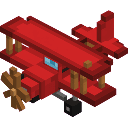
Sky Rider Biplane adds a rideable, multiblock aircraft to Minecraft. Place the item in the world to build the full biplane structure, then right-click it to take to the skies. The biplane is a fully steerable vehicle with throttle control, a live HUD, and a distinctive backward-facing cockpit that gives it a tail-first flight style.
What It Adds
- Sky Rider Biplane — a craftable block item that deploys a large multiblock biplane structure when placed.
- Biplane Vehicle — a rideable flying entity spawned by right-clicking the placed structure. It has no gravity, is not pushable, and disappears back into a dropped item if destroyed.
- Flight HUD — a heads-up display shown while riding, displaying speed (blocks/second), heading (degrees), and altitude, plus a control reminder bar.
How To Use
Placing the Biplane
Place the Sky Rider Biplane item anywhere in the world with enough open space around it. The full multiblock structure assembles automatically. Right-click any block of the structure to convert it into the vehicle entity and board it.
Controls
| Action | Key |
|---|
| Accelerate | W |
| Brake / Slow Down | S |
| Steer (yaw & pitch) | Mouse |
| Exit vehicle | Ctrl |
Releasing W or S keeps your current speed — the biplane cruises at whatever speed you leave it at.
The Backward Cockpit
The cockpit is rear-facing: your camera looks away from the nose of the plane. The biplane flies tail-first, so the direction you are looking is the direction of travel. To see where the nose is pointing, look behind you.
Inverted Pitch
Vertical steering is inverted:
- Look up → biplane dives
- Look down → biplane climbs
Pitch your mouse the opposite direction from what you might expect.
HUD Readouts
While riding, a panel appears at the top of the screen:
- SPD — current speed in blocks per second
- HDG — current heading in degrees
- ALT — current altitude (Y coordinate)
Crafting And Obtaining
Craft the Sky Rider Biplane at a crafting table:
The recipe uses Phantom Membranes, White Wool, Sticks, a Chest, Iron Ingots, and a Lever. The item is also available directly from the Creative inventory.
Abilities And Mechanics
- No gravity — the biplane holds altitude on its own; you control climb and dive entirely through pitch.
- Speed range — speed ramps up with W and down with S, with minimum and maximum limits. Releasing both keys holds your current speed for smooth cruising.
- Rider invisibility — your player model is hidden while piloting so it does not obstruct your view of the aircraft.
- Auto third-person view — boarding automatically switches you to third-person back camera; dismounting restores your previous camera setting.
- Damage & recovery — if the vehicle takes any damage it ejects you, drops a Sky Rider Biplane item, and disappears. Pick up the dropped item to place and fly again.
- Sneak ≠ dismount — pressing Shift does not dismount you while riding the biplane. Use Ctrl to exit.
Progression And Strategy
- Build the biplane early with basic materials (iron, sticks, wool, a chest, and phantom membranes from Phantoms).
- Choose large open areas — plains, oceans, or above the cloud layer — for takeoff and landing room.
- Practice pitch inversion before attempting tight maneuvers: push mouse down to climb, up to dive.
- Monitor the ALT readout on the HUD to avoid flying too low in hilly terrain.
- Keep a spare biplane item in your inventory; a single hit destroys the vehicle, so having a backup lets you redeploy quickly.