

Description
Make me a mod where there is a dungeon in a separate dimension from the overworld, and you can find portals that lead to it. Make it so every time a player finds it and goes into it, the dimensions change the biome changes, and the layout of the dungeon changes.The Labyrinth is reached from the Overworld using a key and a lodestone—not a built portal frame. Each entry creates a fresh maze run in one of three themed realms. The realm’s theme and the maze layout shift between runs. What It Adds Realm theme Dungeon look Verdant Halls Mossy stone-brick rooms lit with glowstone Ember Vaults Blackstone and polished blackstone-brick rooms with shroomlight Frost Catacombs Deepslate-brick rooms with sea lanterns The mod also adds the Labyrinth Key, portal ruins, and Labyrinth Sentinels. A Labyrinth Sentinel Spawn Egg is available in Creative mode. How To Use Enter: Use the key on a lodestone in the Overworld. A menu lets you enter or stay where you are. The key works on any Overworld lodestone, so you can also place one yourself. Return: Use the key while in a Labyrinth realm to open the return menu. Choose Return Home or remain in the dungeon. Explore: Each run generates a new arrangement of connected rooms. Keep track of turns and watch for guards as you search through it. Crafting And Obtaining The Labyrinth Key is crafted at a crafting table: Abilities And Mechanics Labyrinth Sentinels are hostile, skeleton-like guards that use bows at range and can attack at close quarters. Each run in a non-Peaceful world places five guards. They drop a bow and may also drop leather armor. Progression And Strategy Bring armor, food, and a weapon before entering. Use walls and corners for cover from Sentinel arrows, and mark or remember your route through the maze. Keep the key with you: it opens the way in and provides the return option.
Mod Wiki
Shifting Labyrinth
Quickstart
- Craft a Labyrinth Key at a crafting table using the recipe below.
- In the Overworld, use the key on any lodestone. You can find one or place your own.
- Choose Enter the Labyrinth in the menu. Each trip opens a newly arranged maze in one of three themed realms.
- Take the key with you. Use it anywhere in a Labyrinth realm and choose Return Home when you want to leave, or remain in the dungeon.
Overview
Shifting Labyrinth is a maze exploration mod centered on repeat journeys to a separate realm. The realm’s theme and connected-room layout shift between runs. Portal ruins appear as Labyrinth scenery, but entry is through a lodestone and key—not a built portal frame.
What It Adds
| Realm | Dungeon materials and lighting |
|---|---|
| Verdant Halls | Stone-brick floors, mossy stone-brick walls, and glowstone |
| Ember Vaults | Blackstone floors, polished blackstone-brick walls, and shroomlight |
| Frost Catacombs | Deepslate-tile floors, deepslate-brick walls, and sea lanterns |
It also adds the Labyrinth Key, portal ruins, and hostile Labyrinth Sentinels. A Labyrinth Sentinel Spawn Egg is available in Creative mode.
How To Use
- Enter: In the Overworld, use the key on a lodestone and select Enter the Labyrinth. Choose Stay Here to cancel the trip.
- Return: In a Labyrinth realm, use the key anywhere. Select Return Home to go back to the Overworld spawn, or Remain in the Dungeon to keep exploring.
- Explore: Follow the connected rooms and keep track of your turns. Watch for Sentinels along the way.
Crafting And Obtaining
Craft one Labyrinth Key at a crafting table:


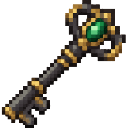
In Creative mode, use the Labyrinth Sentinel Spawn Egg to spawn a Sentinel.
Abilities And Mechanics
Labyrinth Sentinels are hostile, skeleton-like guards. They shoot bows at range and can attack up close. In non-Peaceful worlds, each run places five guards. They drop a bow and may also drop leather armor.
Progression And Strategy
Bring armor, food, and a weapon before entering. Use walls and corners for cover from arrows, and mark or remember your route through the maze. Keep the key in your inventory so you can open the return menu at any time.
How to install
Download the mod and follow the step-by-step installation guide.
This mod is licensed under the CreativeMode Mods License.