

Description
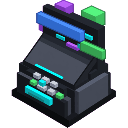
Placeable Searchbound Terminal: a computer block that, when used, manifests search results (summons entities/creates blocks or effects based on queries).
Mod Wiki
Searchbound Terminal
Quickstart
- Craft the Searchbound Terminal at a crafting table using the recipe below.
- Place the item in the world — it assembles into a 2×2×2 multi-block terminal that automatically faces the direction you placed it.
- Interact (tap/right-click) the terminal to open a search UI.
- Pick a query from the list and confirm. The terminal manifests the result immediately — spawning entities or applying effects near the block.
- Each terminal has a 2-second cooldown between uses.


Overview
The Searchbound Terminal is a placeable computer block that lets players "search" for in-game phenomena and instantly bring them into the world. Selecting a query from the terminal's menu triggers a real effect — hostile mobs appear, helpful entities are deployed, player buffs are applied, or dangerous events are unleashed. It's a fun, interactive device suited for adventure maps, mini-games, or just chaotic sandbox play.
What It Adds
| Content | Description |
|---|---|
| Searchbound Terminal (item) | Craftable item that places the terminal block |
| Terminal block | A direction-aware 2×2×2 decorative computer structure |
| Search results | A menu of queries, each producing a unique in-world effect |
How To Use
- Place the terminal on any solid surface. It orients to the cardinal direction you face when placing it.
- Interact with any part of the structure to open the search menu.
- Choose a query from the list. Each query shows a label describing what it will do.
- The terminal executes the result next to itself — mobs spawn a few blocks away, effects are applied to you, or special events trigger in the area.
- Wait 2 seconds before using the same terminal again.
Tip: Give yourself space. Several queries spawn hostile or explosive entities right beside the terminal.
Abilities And Mechanics
Direction Awareness
When placed, the terminal reads the direction you are facing and assembles itself to face that same direction. You cannot rotate it after placement; break and re-place to change orientation.
Multi-Block Structure
The terminal occupies a 2×2×2 footprint. All eight sub-blocks are placed automatically when the main item is used. Mining any part of the structure with your hands takes about 1.5 seconds. The structure has no explosion resistance, so keep it away from volatile queries.
Search Queries & Results
| Query Label | Effect |
|---|---|
| creeper | Spawns a Creeper near the terminal |
| zombie horde | Spawns 4 Zombies in a ring around the terminal |
| fireball rain | Launches 3 Fireballs from above the terminal in quick succession |
| snow storm | Summons 3 Snow Golems near the terminal |
| iron golem guard | Deploys an Iron Golem beside the terminal |
| wither boss | ⚠️ Manifests a Wither nearby — use with extreme caution |
| night vision | Grants the interacting player Night Vision for 60 seconds |
| teleport origin | Teleports the interacting player to coordinates 0, 64, 0 |
Cooldown
Each individual terminal block has its own 2-second (40-tick) cooldown. Placing multiple terminals lets you trigger queries in faster succession.
Crafting And Obtaining
Craft the Searchbound Terminal at a crafting table:
The recipe unlocks automatically once you have an Iron Ingot, an Ender Pearl, or a Comparator in your inventory.
Progression And Strategy
- Early use: Start with safe queries like night vision or iron golem guard to get a feel for the terminal without immediate danger.
- Combat arenas: Place several terminals around a fighting area and use zombie horde or creeper to populate encounters on demand.
- Risk/reward: The wither boss query is the most dangerous result available. Only trigger it in a controlled environment — an enclosed arena, far from your base.
- Multiple terminals: Because each block has its own cooldown, building a row of terminals lets you chain queries quickly for complex scenarios or events.
- Fireball rain: Fireballs spawn high above the terminal and fall — bystanders and the terminal itself can take damage. Clear the area before using it.
How to install
Download the mod and follow the step-by-step installation guide.
This mod is licensed under the CreativeMode Mods License.