

Description
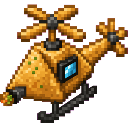
The Samosa Chopper is a rideable helicopter vehicle built from a multiblock structure that lets you soar through the skies with no gravity holding you back. Once placed, simply right-click the structure to mount it and take flight using WASD to move, Space to ascend, and Shift to descend. While riding, the chopper automatically fires explosive samosa projectiles every 1.5 seconds in the direction you are looking, each one creating a TNT-level explosion roughly 15 blocks ahead. Press Ctrl to dismount and leave the chopper parked, ready to be boarded again whenever you return.
Mod Wiki
Samosa Sky Chopper
Quickstart
- Craft the Samosa Sky Chopper item using the recipe below, then place it anywhere in the world.
- Right-click the structure to instantly mount and launch into the air.
- Fly with W/A/S/D to move, Space to ascend, and Shift to descend.
- Press Ctrl to dismount and leave the chopper parked wherever you land.


Overview
The Samosa Sky Chopper is a rideable helicopter vehicle that lets you fly freely through the sky with no gravity pulling you down. It assembles as a multiblock structure the moment you place it, then converts into a pilotable entity the instant you board it. While airborne, it automatically fires explosive samosa projectiles at everything in your crosshairs — making it both a transport and a weapon.
What It Adds
| Content | Description |
|---|---|
| Samosa Sky Chopper (item/block) | The craftable item that places the helicopter structure |
| Chopper Vehicle (entity) | The rideable helicopter entity you pilot in-flight |
| Samosa Projectiles | Explosive shots fired automatically while riding |
| Flight HUD | On-screen display showing Speed, Heading, and Altitude |
How To Use
Placing and Boarding
Place the Samosa Sky Chopper block on the ground. It automatically expands into a full multiblock structure. Right-click any part of the structure to board it — the blocks disappear and the vehicle entity takes their place. You are automatically switched to third-person view while riding.
Flying
| Control | Action |
|---|---|
| W / S | Move forward / backward |
| A / D | Strafe left / right |
| Space | Ascend |
| Shift | Descend |
| Ctrl | Dismount |
The chopper has no gravity, so it stays exactly where you leave it when you dismount.
The Flight HUD
While riding, a dark bar appears at the top of your screen showing three live readouts:
- SPD — current speed in blocks per second
- HDG — heading in degrees
- ALT — altitude (Y coordinate)
Dismounting and Retrieving
Press Ctrl to dismount. The chopper remains as an entity in the world, ready to be boarded again with a right-click. If the chopper takes damage, it drops the Samosa Sky Chopper item so you can pick it up and deploy it again elsewhere.
Crafting And Obtaining
The recipe is unlocked automatically when you join a world. Craft the Samosa Sky Chopper at a crafting table:
The item stacks to 1, so you can only carry one at a time.
Abilities And Mechanics
Explosive Samosa Cannons
While you are riding the chopper, it automatically fires a samosa projectile roughly every 1.5 seconds in the direction you are looking. Each projectile detonates at approximately 15 blocks ahead of the chopper with a TNT-level explosion. There is no manual trigger — the cannons fire continuously as long as you are mounted. Aim carefully near your own builds.
No Gravity
The chopper entity has zero gravity. It will not fall when unoccupied and maintains altitude without any input while you are riding.
Sound
The chopper plays a looping engine sound effect while in operation.
Shift Dismount Suppression
Normally, holding Shift while riding an entity dismounts you. On the Samosa Sky Chopper, Shift is repurposed for descending and will not cause you to fall off — use Ctrl to dismount intentionally.
Progression And Strategy
- Early combat use: The automatic explosive fire makes the chopper a powerful offensive tool against surface structures, outdoor mobs, and enemy players. Approach targets from altitude and let the cannons do the work.
- Exploration: The chopper's free-flight movement with no gravity restrictions makes it excellent for rapidly surveying terrain, crossing oceans, or reaching high mountain peaks.
- Parking safely: Dismount over solid ground when not in use. If the vehicle takes any damage it drops as an item, so avoid leaving it in dangerous areas.
- Watch your surroundings: The auto-firing projectiles detonate at TNT strength. Keep distance from your own base and from other players you do not intend to attack.
How to install
This Java mod can be used on Windows and Mac PCs with the CreativeMode Launcher or any Minecraft launcher of your choice.

1. Download and install the new CreativeMode Launcher

2. Click to play on the top of the screen.
3. That's it — launches instantly. No complicated setup required.
Want to use on a different launcher? Download mod and manually install.
This mod is licensed under the CreativeMode Mods License.