

Description
Store treasures in safes that keep their contents when broken, and nest safes for expandable storage.
Mod Wiki
Safes
Quickstart
Craft a Safe in a crafting table:

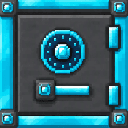

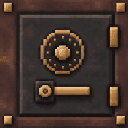
Place it, then right-click it to open its inventory. Store items inside and mine the Safe with an iron pickaxe or better: it drops as an item while keeping its contents. Place the dropped Safe again to retrieve them.
Overview
Safes are reusable storage blocks that retain their inventories when broken. Four tiers offer different storage capacities, and you can store one Safe inside another to carry or organize multiple inventories.
What It Adds
| Safe | Storage |
|---|---|
| Safe | 27 slots |
| Gold-Plated Safe | 56 slots |
| Diamond-Plated Safe | 83 slots |
| Debris-Plated Safe | 110 slots |
How To Use
- Open storage: Right-click a placed Safe.
- Move items: Use the inventory screen as you would a chest; shift-clicking moves items between your inventory and the Safe.
- Browse larger Safes: Use the
<and>buttons at the top-right of the screen to switch pages. - Move a stocked Safe: Mine it with an iron pickaxe or better, then place it where you want it.
- Nest Safes: Put a Safe item inside another Safe’s inventory. To use the inner Safe’s storage, take it out and place it.
Crafting And Obtaining
Each tier can be crafted around a chest, or made by upgrading another Safe. The chest recipes use eight matching materials around a chest; upgrades use eight materials around the Safe being upgraded. Upgrading carries over the Safe’s stored items.
| Result | From a chest | Upgrade recipes |
|---|---|---|
| Safe | — | |
| Gold-Plated Safe | From Safe: | |
| Diamond-Plated Safe | From Safe: ; from Gold-Plated Safe: | |
| Debris-Plated Safe | From Safe: ; from Gold-Plated Safe: ; from Diamond-Plated Safe: |
Abilities And Mechanics
A Safe’s contents stay with it when it is mined and dropped as an item. Larger tiers have more slots and use multiple inventory pages; the basic Safe fits on one page.
Progression And Strategy
Start with a Safe for everyday storage, then upgrade it as you gather gold, diamonds, and ancient debris. Upgrade a stocked Safe to keep its contents, or nest Safes when you want to transport several separate inventories.
How to install
This Java mod can be used on Windows and Mac PCs with the CreativeMode Launcher or any Minecraft launcher of your choice.

1. Download and install the new CreativeMode Launcher

2. Click to play on the top of the screen.
3. That's it — launches instantly. No complicated setup required.
Want to use on a different launcher? Download mod and manually install.
This mod is licensed under the CreativeMode Mods License.