


Description
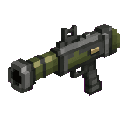
The Rocket Launcher is a powerful explosive weapon that fires rockets capable of devastating anything in their path. Right-click to launch a rocket projectile that travels forward, leaving a trail of smoke particles, and detonates on contact with any block or entity in a TNT-level explosion dealing massive area damage. After each shot, the launcher enters a 5-second cooldown before it can be fired again, so make sure your aim counts!
Mod Wiki
Rocket Launcher
Quickstart
- Open your inventory and craft the Rocket Launcher at a crafting table (recipe below), or find it in the Combat creative tab.
- Hold the Rocket Launcher in your hand.
- Right-click to fire a rocket in the direction you are looking.
- The rocket detonates on contact with any block or mob — stay back to avoid the blast!
Overview
The Rocket Launcher is a single-item mod that adds a devastating ranged explosive weapon to your arsenal. It fires a physical rocket projectile that travels forward, leaving a trail of smoke particles in its wake. Upon striking any block or entity, it triggers a TNT-strength explosion capable of obliterating terrain and enemies across a wide area. A built-in cooldown system keeps the weapon balanced, rewarding careful aim over rapid fire.
What It Adds
| Item | Stack Size | Found In |
|---|---|---|
| Rocket Launcher | 1 | Combat creative tab / crafting |
How To Use
- Right-click (Use Item) while holding the Rocket Launcher to launch a rocket.
- The rocket travels in the direction your crosshair is pointing at a brisk speed, with a slight spread.
- A smoke particle trail follows the rocket so you can track it in flight.
- On impact with a block or any entity, a TNT-level explosion is triggered, dealing massive area damage and destroying blocks in the blast radius.
- A launch sound plays each time you fire.
- After firing, the launcher enters a 5-second cooldown (shown by the item's cooldown overlay in your hotbar). You cannot fire again until the cooldown expires.
Abilities And Mechanics
| Property | Value |
|---|---|
| Explosion power | TNT-equivalent (3.0) |
| Explosion source type | TNT |
| Rocket travel speed | 2.5 blocks/tick |
| Cooldown after firing | 5 seconds (100 ticks) |
| Max stack size | 1 |
- The rocket is a physical projectile — it can be outrun or dodged, and it travels in an arc rather than instantly.
- The explosion destroys blocks as a TNT explosion would, so be mindful when firing near your own structures.
- Self-damage is possible — do not fire at close range or at your feet.
Progression And Strategy
- Craft early, use carefully. The materials (Fire Charges, Iron Ingots, TNT) are mid-game accessible, making the Rocket Launcher a strong option once you have a reliable source of gunpowder and iron.
- Manage your cooldown. With only one shot every 5 seconds, make each rocket count. Prioritize high-value targets such as groups of mobs or bosses.
- Maintain distance. The TNT-level blast will harm you if you are too close at detonation. Use elevated terrain or fire from range.
- Siege tool. The block-destroying explosion makes the Rocket Launcher useful for breaching enemy structures or clearing terrain quickly.
- One at a time. The item does not stack, so carry it in a dedicated hotbar slot for quick access during combat.
How to install
This Java mod can be used on Windows and Mac PCs with the CreativeMode Launcher or any Minecraft launcher of your choice.

1. Download and install the new CreativeMode Launcher

2. Click to play on the top of the screen.

3. That's it — launches instantly. No complicated setup required.
Want to use on a different launcher? Download mod and manually install.
This mod is licensed under the CreativeMode Mods License.