

Description
Lasso blocks and mobs, warp through paired rifts, and recruit allies for the fight.
Mod Wiki
Grapple Hook and More
Quickstart
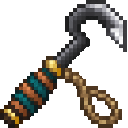
- In Creative Mode, find the four tools in the Combat inventory tab. For survival play, craft the lasso and Grapple Hook using the recipes below.
- Try the Riftbound Arsenal (the lasso): right-click a mob or block to pick it up, then right-click a destination to release it.
- Equip the Grapple Hook and right-click to fire. When it catches a block, jump to reel in and crouch to lengthen the rope.
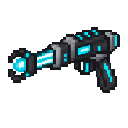
- With the Portal Gun, right-click and release within 3 seconds to fire the selected rift. Hold right-click for more than 3 seconds and release to switch colors; place one rift of each color, then step onto either to travel to the other.
- Use the Pact Staff on a living mob to bind it as an ally.
Overview
Riftbound Arsenal is a set of tools for moving blocks and mobs, swinging from a tether, traveling through paired rifts, and recruiting mobs to fight alongside you.
What It Adds
| Tool | Main use |
|---|---|
| Riftbound Arsenal | Lasso a block or mob and set it down elsewhere |
| Grapple Hook | Hook blocks to swing, or catch and launch mobs |
| Portal Gun | Place paired blue and orange rifts for travel |
| Pact Staff | Bind mobs as allies that defend you |
How To Use
Riftbound Arsenal (Lasso)
Right-click a mob or a block to pick it up. Right-click another block, mob, or the air to release it. A block picked up by the lasso is removed without dropping an item; the lasso places it in a nearby open space when you release it.
You can lasso ordinary blocks, but not blocks with block entities, blocks containing fluid, or unbreakable blocks. If there is no room to release your target, it stays held until you try another spot. Lassoed mobs are held in front of you, then returned to their usual AI and gravity when released.
Grapple Hook
Right-click to fire the hook in the direction you’re looking. It can latch onto a block or a living mob. Right-click again to recall a hook attached to a block or still in flight; left-click cancels the grapple.
When attached to a block, jump reels you closer and crouch lengthens the rope. Use movement controls to steer your swing. A live grapple also protects you from fall damage while attached.
When the hook catches a mob, hold right-click to charge it, then release to recall the hook and launch the mob toward you. The charge reaches 100% after about 5 seconds. At full charge, the mob is pulled through your position and sent about 50 blocks beyond you.
Portal Gun
The first selected color is blue. Right-click and release within 3 seconds to place a rift of that color where you’re aiming. A block you’re looking at places the rift just beyond its face; if you’re aiming into open air, it appears a short distance ahead.
To switch colors, hold right-click for more than 3 seconds and release. Place one blue and one orange rift, then step onto either endpoint to travel to the other. The gun places only one endpoint of each color at a time; firing that color again moves its endpoint. Only you travel through your pair.
Pact Staff
Right-click a living mob to bind it as an ally. When you’re attacked, your ally can target your attacker; it can also target mobs you attack. Allies do not follow you, so recruit mobs near where you expect to fight.
Crafting And Obtaining
In Creative Mode, all four tools are available in the Combat inventory tab. The lasso and Grapple Hook can also be crafted:




Progression And Strategy
Use the lasso to reposition ordinary blocks or keep a mob in place while you move it. For swinging, aim the Grapple Hook at a high block and use jump to shorten the rope as you build momentum. With the Portal Gun, place the endpoints somewhere easy to reach and leave room to step onto each one. Recruit nearby mobs with the Pact Staff before a fight so they can respond when you’re attacked.
How to install
This Java mod can be used on Windows and Mac PCs with the CreativeMode Launcher or any Minecraft launcher of your choice.

1. Download and install the new CreativeMode Launcher
2. Click to play on the top of the screen.
3. That's it — launches instantly. No complicated setup required.
Want to use on a different launcher? Download mod and manually install.
Players also liked


💎X Heroes 1.2💎


# 🦸 X-HEROES — Become a Superhero! **X-Heroes** — масштабный супергеройский мод для Minecraft, вдохновлённый вселенными **Marvel и DC**! Стань любимым супергероем или суперзлодеем, получи невероятные способности, создавай уникальные костюмы, исследуй новые структуры и сражайся…
This mod is licensed under the CreativeMode Mods License.