

Description
Link camera sites to a monitor and browse your security network from one place.
Mod Wiki
Redstone Watchful Eye
Quickstart
- Craft a Redstone Watchful Eye camera site using the recipe below, or take one from the creative inventory. The Camera Monitor is also available in the creative inventory; it has no crafting recipe.
- Place the camera site. Its camera structure is placed automatically.
- Hold the Camera Monitor and use it on any part of the camera structure to link the site.
- Use the monitor in your hand to open its directory. Select a camera to see its coordinates.
Overview
Redstone Watchful Eye lets you register camera sites to a handheld monitor and browse them from one directory. The monitor can list up to eight linked sites.
What It Adds
- Redstone Watchful Eye: A placeable camera site that creates its structure when placed.
- Camera Monitor: A handheld item for linking sites and opening the camera directory.
How To Use
- Link a site: Use the Camera Monitor on any part of a camera structure. The monitor confirms when a camera is linked.
- Open the directory: Use the monitor while holding it in your main hand or offhand.
- Browse sites: Select a listed camera to view its name and coordinates. Use BACK TO DIRECTORY to return, or X to close the screen.
The directory lists cameras linked to you and shows their locations. VIEW CAMERA does not show live footage: it reports that no video feed is available.
Crafting And Obtaining
Craft the Redstone Watchful Eye camera site:


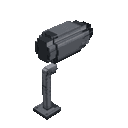
The Camera Monitor is available in the creative inventory; no crafting recipe is provided for it.
Abilities And Mechanics
- You can link up to eight camera sites to the monitor.
- Placing a camera site automatically places its structure. Breaking a part of the structure breaks the rest of it as well.
- The monitor’s directory provides camera names and coordinates, but not a video feed.
Progression And Strategy
Place sites where you want to keep track of locations, then link each one with the monitor. Use the directory to identify a site by its listed coordinates; the monitor is a location index, not a live surveillance display.
How to install
This Java mod can be used on Windows and Mac PCs with the CreativeMode Launcher or any Minecraft launcher of your choice.

1. Download and install the new CreativeMode Launcher

2. Click to play on the top of the screen.
3. That's it — launches instantly. No complicated setup required.
Want to use on a different launcher? Download mod and manually install.
This mod is licensed under the CreativeMode Mods License.