

Description
Use specialized SETSHE-14 multidimensional tablet to give yourself advantage in the harsh and hard worlds
Mod Wiki
Red Star Creature Scanner
Quickstart
- Craft the scanner using the recipe below, or take it from the Creative inventory.
- Hold the Red Star Creature Scanner in your main hand or off-hand and use it.
- Choose a scan type:
- Scan Friendly
- Scan Danger
- Scan Neutral
- Scan Unknown
- Nearby matching creatures glow for 5 seconds, allowing you to track them through walls.
- Wait 5 seconds before scanning again. The scanner has a separate cooldown after every scan.


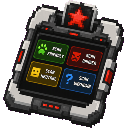
Overview
The Red Star Creature Scanner is a handheld tracking device. It searches the area around you for living creatures in a selected category and applies a glowing outline to every matching target.
The scanner does not require line of sight, so creatures behind walls, underground, or inside enclosed areas can still be highlighted. Players are not included in scans.
How To Use
Use the scanner while holding it to open its control panel. The panel provides four scan buttons:
| Button | Targets |
|---|---|
| Scan Friendly | Passive creatures that are not hostile |
| Scan Danger | Hostile creatures |
| Scan Neutral | Mob creatures that are neither passive nor hostile |
| Scan Unknown | Living entities that are not classified as mobs |
Each scan searches nearby areas within approximately 32 blocks of you. Every matching creature receives the glowing effect for 5 seconds, and the scanner reports how many creatures were highlighted.
The interface remains open while the scan recharges, but all scan buttons are unavailable until the cooldown ends. The scanner can be used from either hand, but it must remain in the hand used to open the panel.
Abilities And Mechanics
- Through-wall tracking: Glowing outlines reveal matching creatures even when blocks obstruct your view.
- Category selection: Choose a specific creature signature instead of highlighting every creature at once.
- Area scan: A scan can highlight multiple matching creatures in the surrounding area.
- Five-second highlight: Targets remain outlined for 100 game ticks, or 5 seconds.
- Five-second recharge: The scanner can perform one scan every 5 seconds.
- No player detection: Other players are not highlighted by any scan category.
- Single-item tool: The scanner does not stack, so keep it in a dedicated inventory slot.
Crafting And Obtaining
The scanner is crafted from iron, redstone, a glass pane, and quartz. The complete crafting recipe is available here:
Its recipe is automatically made available when you join a world. In Creative mode, look for it in the Functional item group.
Progression And Strategy
- Use Scan Danger when exploring caves, abandoned structures, or dark areas where hostile mobs may be hiding.
- Use Scan Friendly to locate animals through forests, hills, or underground enclosures.
- Use Scan Neutral when searching for non-hostile mobs that do not fit the passive category.
- Use Scan Unknown when looking for other living entities that are not recognized as mobs.
- Move between scans when the area contains several creature types; each scan searches only its selected category.
- Since highlights last as long as the recharge, scan again as soon as the cooldown finishes to maintain tracking while exploring.
How to install
This Java mod can be used on Windows and Mac PCs with the CreativeMode Launcher or any Minecraft launcher of your choice.

1. Download and install the new CreativeMode Launcher

2. Click to play on the top of the screen.

3. That's it — launches instantly. No complicated setup required.
Want to use on a different launcher? Download mod and manually install.
This mod is licensed under the CreativeMode Mods License.