


Description
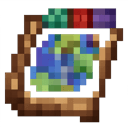
The Realmshift Atlas is a mystical item that automatically records every chunk you visit in the Overworld, Nether, and The End, tracking biome details and exploration progress so you can inspect a crisp, live map of any recorded dimension. Right‑click the atlas to cycle the selected dimension and Sneak (Shift) + Right‑click to open the map; while open use the mouse wheel to zoom, left‑click and drag to pan, and right‑click a location to place a labeled marker, edit an existing marker’s name, or delete a placed marker (markers are saved per dimension on the atlas). The map overlays helpful feature hints—water, lava, trees, villages, ruined portals, and common structures—highlights your current chunk, and includes an on‑screen legend to explain the symbols.
How to install
This Java mod can be used on Windows and Mac PCs with the CreativeMode Launcher or any Minecraft launcher of your choice.

1. Download and install the new CreativeMode Launcher

2. Click to play on the top of the screen.
3. That's it — launches instantly. No complicated setup required.
Want to use on a different launcher? Download mod and manually install.
This mod is licensed under the CreativeMode Mods License.