

Description
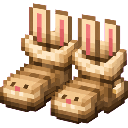
Rabbit Boots are a pair of magical boots that, when equipped in your feet slot, continuously grant Jump Boost III, letting you leap to impressive heights far beyond what is normally possible. Simply put them on and enjoy the extra spring in your step — the effect lasts as long as the boots are worn.
Mod Wiki
Rabbit Boots
Quickstart
- Open your crafting table and craft a pair of Rabbit Boots using the recipe below.
- Place them in your feet armor slot.
- Jump — you now have Jump Boost III and can leap to impressive heights!


Overview
Rabbit Boots are magical boots that grant continuous Jump Boost III whenever they are worn in the feet slot. The effect is applied automatically and refreshes constantly, so it lasts for as long as the boots are equipped.
What It Adds
| Item | Type | Effect |
|---|---|---|
| Rabbit Boots | Foot Armor | Jump Boost III (while worn) |
Crafting And Obtaining
Rabbit Boots are crafted at a crafting table using Rabbit Hide and Slime Balls. The recipe is unlocked as soon as you join a world.
The boots can also be found in the Combat creative tab.
Abilities And Mechanics
- Jump Boost III is applied every tick while the boots occupy your feet slot, allowing you to leap several blocks into the air.
- The effect is silent and shows no particles, but the active icon is visible in your HUD.
- Removing the boots immediately stops the effect from being refreshed; it will expire within a couple of seconds.
- The boots have 336 durability, consistent with standard iron-tier footwear.
Progression And Strategy
- Craft Rabbit Boots early — the ingredients (Rabbit Hide and Slime Balls) are available before visiting the Nether.
- Use them to scale tall terrain, reach high ledges, or navigate mountainous biomes with ease.
- Swap them out when you need the protection of heavier armor, then slip them back on for mobility.
- Pairing with a Feather Falling enchantment on another piece of armor (or using Slow Falling potions) is recommended, since the extra jump height also means a longer fall.
How to install
This Java mod can be used on Windows and Mac PCs with the CreativeMode Launcher or any Minecraft launcher of your choice.

1. Download and install the new CreativeMode Launcher

2. Click to play on the top of the screen.

3. That's it — launches instantly. No complicated setup required.
Want to use on a different launcher? Download mod and manually install.
This mod is licensed under the CreativeMode Mods License.