

Description
Portal Guns adds craftable Blue and Orange Portal Gun items with custom icons and recipes so you can place linked portals on block faces and zip between them. Use a portal gun on a block face to set that color portal; once both ends are placed, walking into one teleports you to the other with cooldown protection, sounds, particles, and action‑bar status; holding a gun displays the portal coordinates and link readiness, and sneak‑use recalls the matching portal. Each player’s portal endpoints persist across reloads and work across dimensions; no additional structures or dungeons are included.
Mod Wiki
Portal Launcher
Quickstart
- Open a Crafting Table and craft the Blue Portal Gun and Orange Portal Gun (recipes below).
- Hold either gun and use it on a block face to place that color's portal at that location.
- Place both colors on different block faces.
- Walk into either portal — you'll be instantly teleported to the other end!


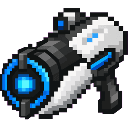

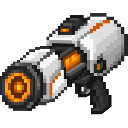
Overview
Portal Launcher adds two craftable portal guns that let you create a pair of linked teleportation portals anywhere in the world. Shoot a blue portal on one wall and an orange portal on another — even in a different dimension — then step through either one to zip between them instantly. Portals persist through world reloads and remember their locations per player.
What It Adds
| Item | Description |
|---|---|
| Blue Portal Gun | Places or recalls the blue portal endpoint |
| Orange Portal Gun | Places or recalls the orange portal endpoint |
Both guns appear in the Equipment tab of your inventory.
How To Use
Placing Portals
- Use on a block face with either gun to anchor that portal to the surface of that block. A sound plays and your action bar confirms the location.
- You need one blue portal and one orange portal placed to form a working link.
Teleporting
- Simply walk into a placed portal. As long as both ends are set, you'll be teleported to the opposite portal instantly.
- A brief cooldown (~1.75 seconds) prevents accidental rapid teleportation.
- A sound effect and action-bar message confirm each teleport.
Recalling Portals
- Sneak + Use (while aimed at air) with a portal gun to recall (remove) that color's portal.
HUD Status
- While holding either portal gun, your action bar continuously shows the coordinates of both portals and whether the link is READY or still needs both ends placed.
- Using a gun in the air (without sneaking) also displays both portal locations as a quick status check.
Abilities And Mechanics
- Cross-dimension travel — Portals work across the Overworld, Nether, and End. If your two endpoints are in different dimensions, stepping through will move you between them.
- Persistent endpoints — Your portal locations are saved per player and survive world reloads. Each player has their own independent pair of portals.
- Particle rendering — Active portals continuously emit colored particles so you can always see where they are.
- Blocked destination — If the exit point is obstructed or unsafe, the teleport is cancelled and a warning appears on your action bar.
Progression And Strategy
- Craft both guns as soon as you have copper, redstone, and either lapis lazuli or orange dye.
- Use portals to create fast travel routes between your base and resource areas, or to set up instant escapes.
- Because portals work across dimensions, you can maintain a permanent shortcut between, for example, your Overworld base and a Nether outpost.
- Remember that sneak-using a gun recalls that portal — useful for moving an endpoint to a new location without losing your other anchor.
How to install
Download the mod and follow the step-by-step installation guide.
This mod is licensed under the CreativeMode Mods License.